<?xml version="1.0" encoding="utf-8"?>
<feed xmlns="http://www.w3.org/2005/Atom">
    <id>https://docs.scnx.xyz/blog/</id>
    <title>SCNX News</title>
    <updated>2026-02-20T21:00:00.000Z</updated>
    <generator>https://github.com/jpmonette/feed</generator>
    <link rel="alternate" href="https://docs.scnx.xyz/blog/"/>
    <subtitle>Receive semi-regular news about SCNX</subtitle>
    <icon>https://docs.scnx.xyz/img/favicon.ico</icon>
    <rights>Copyright © 2026 ScootKit UG (haftungsbeschränkt)</rights>
    <entry>
        <title type="html"><![CDATA[Introducing Featureboard: The New Way to Shape the Future of SCNX]]></title>
        <id>https://docs.scnx.xyz/blog/introducing-featureboard/</id>
        <link href="https://docs.scnx.xyz/blog/introducing-featureboard/"/>
        <updated>2026-02-20T21:00:00.000Z</updated>
        <summary type="html"><![CDATA[We're introducing a new AI-powered product to make suggestions more clear and productive for everyone.]]></summary>
        <content type="html"><![CDATA[<p>Hey everyone,</p>
<p>We have some massive news to share today. If you've been part of the SCNX community for a while, you know that we thrive on your feedback. Whether it's a suggestion for a new module, a tweak to the leveling system, or a crazy idea — your input builds this platform.</p>
<p>But as our community has grown, keeping track of all those brilliant ideas has become a challenge. We realized we needed a better system. We needed a way to make feedback transparent, organized, and truly democratic.</p>
<p><strong>Today, we are proud to launch Featureboard — a community-driven feedback platform that uses AI to provide you with a better experience and give us a clearer overview of new features.</strong></p>
<h2 class="anchor anchorTargetStickyNavbar_Vzrq" id="why-we-built-featureboard">Why we built Featureboard<a href="https://docs.scnx.xyz/blog/introducing-featureboard/#why-we-built-featureboard" class="hash-link" aria-label="Direct link to Why we built Featureboard" title="Direct link to Why we built Featureboard" translate="no">​</a></h2>
<p>For a long time, user feedback was a bit of a "black box." You would submit an idea, and maybe you'd hear back, or maybe it would end up on a long internal to-do list. We wanted to change that.</p>
<p>Featureboard was built to solve three main problems:</p>
<ol>
<li class=""><strong>Transparency:</strong> We want you to see exactly what other users are suggesting and what our team is thinking.</li>
<li class=""><strong>Prioritization:</strong> We can't build everything at once. Featureboard lets the community vote, so the most important features rise to the top naturally.</li>
<li class=""><strong>Communication:</strong> You deserve to know when an idea is planned, in progress, or shipped.</li>
</ol>
<h3 class="anchor anchorTargetStickyNavbar_Vzrq" id="more-efficiency-more-features">More Efficiency, More Features<a href="https://docs.scnx.xyz/blog/introducing-featureboard/#more-efficiency-more-features" class="hash-link" aria-label="Direct link to More Efficiency, More Features" title="Direct link to More Efficiency, More Features" translate="no">​</a></h3>
<p>While Featureboard creates a much better experience for you, it is also a game-changer for our team. It allows us to keep track of suggestions effortlessly and get a clear view of what is most important to our community. Because of the new AI features, maintenance is very easy — tasks like moderation are <strong>completely automated</strong>. This means we spend less time sorting tickets and more time building the features you want.
<span class="testa"> <img decoding="async" loading="lazy" alt="Screenshot with a list of all the AI Features of Featureboard" src="https://docs.scnx.xyz/assets/images/ai-b7d63ab7dee8d4209449a3297876dcfc.png" width="1919" height="734" class="img_ev3q"></span></p>
<h2 class="anchor anchorTargetStickyNavbar_Vzrq" id="how-it-works-ride-the-wave">How it Works: Ride the Wave<a href="https://docs.scnx.xyz/blog/introducing-featureboard/#how-it-works-ride-the-wave" class="hash-link" aria-label="Direct link to How it Works: Ride the Wave" title="Direct link to How it Works: Ride the Wave" translate="no">​</a></h2>
<p>Using Featureboard is simple, but powerful. It puts the control in your hands.</p>
<p><strong>1. Share Your Idea</strong>
Got a vision for SCNX? <a href="https://featureboard.net/submit" target="_blank" rel="noopener noreferrer" class="">Submit a suggestion</a>. It could be a new feature, an improvement, or even a completely new product direction. You can write your suggestion in multiple languages: FeatureBoard translates it automatically, and our AI-powered system even helps categorize it for us.</p>
<p><strong>2. Processing</strong>
This is where the magic happens. <a href="https://featureboard.net/browse" target="_blank" rel="noopener noreferrer" class="">Browse the feed</a> to see what others are suggesting. If you see an idea you love, give it an upvote. Featureboard calculates metrics like the <strong>Popularity Score</strong> and the <strong>Implementation Likelihood</strong> live, keeping the community updated in real-time.
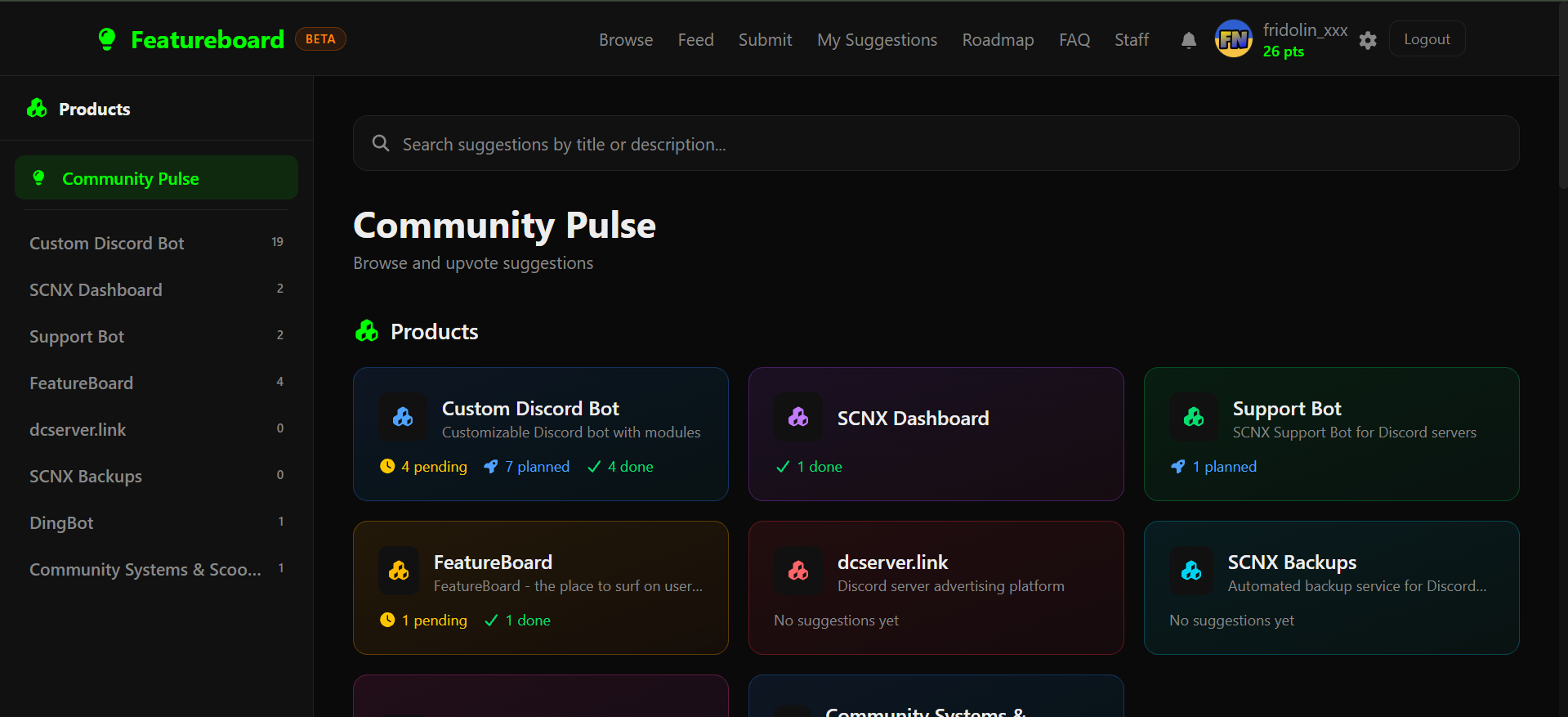
<span class="testa"> <img decoding="async" loading="lazy" alt="Screenshot showing the &amp;quot;Browse&amp;quot;-Tab of Featureboard" src="https://docs.scnx.xyz/assets/images/browse-cf800c797382bf35ab6695f1531dc963.png" width="1919" height="877" class="img_ev3q"></span></p>
<p><strong>3. We Build It</strong>
We use top-voted suggestions to guide our roadmap. While a high upvote count doesn't automatically guarantee implementation — we still have to consider technical feasibility and our overall product vision — it is the absolute best way to show our team what you want to see next.</p>
<h2 class="anchor anchorTargetStickyNavbar_Vzrq" id="full-visibility-with-the-public-roadmap">Full Visibility with the Public Roadmap<a href="https://docs.scnx.xyz/blog/introducing-featureboard/#full-visibility-with-the-public-roadmap" class="hash-link" aria-label="Direct link to Full Visibility with the Public Roadmap" title="Direct link to Full Visibility with the Public Roadmap" translate="no">​</a></h2>
<p>One of our favorite parts of Featureboard is the <a href="https://featureboard.net/roadmap" target="_blank" rel="noopener noreferrer" class=""><strong>Open Roadmap</strong></a>.</p>
<p>Instead of wondering if a feature is coming "soon," you can check the roadmap to see the real-time status. You can see what's <strong>In Progress</strong>, what's <strong>Planned</strong> for the near future, and what's currently in the <strong>Backlog</strong> for the community to vote on.</p>
<p>This level of transparency means no surprises. You drive the decisions, and you can watch as your feedback turns into real features on SCNX.
<span class="testa"> <img decoding="async" loading="lazy" alt="Screenshot showing the Roadmap of Featureboard" src="https://docs.scnx.xyz/assets/images/roadmap-72072edde86288d1b3adc6c0cd877d85.png" width="1919" height="882" class="img_ev3q"></span></p>
<h2 class="anchor anchorTargetStickyNavbar_Vzrq" id="supporting-development--priority-suggestions">Supporting Development &amp; Priority Suggestions<a href="https://docs.scnx.xyz/blog/introducing-featureboard/#supporting-development--priority-suggestions" class="hash-link" aria-label="Direct link to Supporting Development &amp; Priority Suggestions" title="Direct link to Supporting Development &amp; Priority Suggestions" translate="no">​</a></h2>
<h3 class="anchor anchorTargetStickyNavbar_Vzrq" id="memberships">Memberships<a href="https://docs.scnx.xyz/blog/introducing-featureboard/#memberships" class="hash-link" aria-label="Direct link to Memberships" title="Direct link to Memberships" translate="no">​</a></h3>
<p>Featureboard is free for everyone to browse and submit. However, building and maintaining high-quality software takes resources. To help us continue offering fair prices and cool features, a <a href="https://membership.scootkit.com/" target="_blank" rel="noopener noreferrer" class="">ScootKit Membership Level 3</a> gives you <strong>Prioritized Suggestions</strong> for faster review, priority placement, and doubles your daily upvote limit from 5 to 10. You also get priority support on our Discord.</p>
<h3 class="anchor anchorTargetStickyNavbar_Vzrq" id="sponsor-a-feature-fast-track-your-vision">Sponsor a Feature: Fast-Track Your Vision<a href="https://docs.scnx.xyz/blog/introducing-featureboard/#sponsor-a-feature-fast-track-your-vision" class="hash-link" aria-label="Direct link to Sponsor a Feature: Fast-Track Your Vision" title="Direct link to Sponsor a Feature: Fast-Track Your Vision" translate="no">​</a></h3>
<p>Sometimes, you need a feature <em>now</em>, and you don't want to wait for it to climb the voting ranks.</p>
<p>We are introducing a new <strong>"Sponsor a Feature"</strong> option. This is for power users or businesses who want to guarantee that a specific feature gets built. When you sponsor a feature, you get:</p>
<ul>
<li class=""><strong>Guaranteed Implementation:</strong> Your feature gets a dedicated development slot.</li>
<li class=""><strong>Direct Access:</strong> You'll be in direct communication with the dev team during the build.</li>
<li class=""><strong>Branding:</strong> Your name or logo will be displayed as the sponsor on the roadmap and release notes.</li>
</ul>
<p>It's a win-win: you get the tool you need, and the whole community benefits from the new feature. <a href="https://featureboard.net/sponsored" target="_blank" rel="noopener noreferrer" class="">Learn more about Sponsoring</a>.</p>
<h2 class="anchor anchorTargetStickyNavbar_Vzrq" id="one-more-thing-featureboard-for-everyone">One More Thing... Featureboard for Everyone<a href="https://docs.scnx.xyz/blog/introducing-featureboard/#one-more-thing-featureboard-for-everyone" class="hash-link" aria-label="Direct link to One More Thing... Featureboard for Everyone" title="Direct link to One More Thing... Featureboard for Everyone" translate="no">​</a></h2>
<p>We built Featureboard because we needed it for SCNX. But as we built it, we realized that other communities need this too.</p>
<p>If you run your own SaaS, Discord community, or software project, <strong>you can use Featureboard too.</strong> We are offering a white-label version that is fully branded to your project, endlessly customizable, and AI-powered.</p>
<p>If you are interested in launching your own feedback platform, we would love for you to <a href="https://featureboard.net/for-companies" target="_blank" rel="noopener noreferrer" class="">get in touch with us</a>.</p>
<h2 class="anchor anchorTargetStickyNavbar_Vzrq" id="start-voting-today">Start Voting Today<a href="https://docs.scnx.xyz/blog/introducing-featureboard/#start-voting-today" class="hash-link" aria-label="Direct link to Start Voting Today" title="Direct link to Start Voting Today" translate="no">​</a></h2>
<p>We are incredibly excited to open this up to you. The roadmap is already filling up, and there are some great suggestions waiting for your vote.</p>
<p>Head over to the new site, log in, and help us shape the future of SCNX.</p>
<p><a href="https://featureboard.net/" target="_blank" rel="noopener noreferrer" class=""><strong>Visit Featureboard →</strong></a></p>]]></content>
        <author>
            <name>Fridolin</name>
        </author>
        <category label="Newsletter" term="Newsletter"/>
        <category label="SCNX" term="SCNX"/>
        <category label="Featureboard" term="Featureboard"/>
    </entry>
    <entry>
        <title type="html"><![CDATA[Celebrate Christmas with a Discord Advent Calendar from SCNX]]></title>
        <id>https://docs.scnx.xyz/blog/2025-winter-holidays/</id>
        <link href="https://docs.scnx.xyz/blog/2025-winter-holidays/"/>
        <updated>2025-11-28T10:00:00.000Z</updated>
        <summary type="html"><![CDATA[Use our new module completely free of charge to offer an advent calendar on your Discord server!]]></summary>
        <content type="html"><![CDATA[<p>Hey there,</p>
<p>the holidays are just around the corner! Christmas is coming up, so it's time to prepare an event for your Discord – and it's super easy with SCNX!</p>
<h2 class="anchor anchorTargetStickyNavbar_Vzrq" id="-december-starts-soon">📅 December starts soon<a href="https://docs.scnx.xyz/blog/2025-winter-holidays/#-december-starts-soon" class="hash-link" aria-label="Direct link to 📅 December starts soon" title="Direct link to 📅 December starts soon" translate="no">​</a></h2>
<p>December starts soon - and with it, many people will open a door every day until Christmas again. This increases the anticipation for Christmas and sweetens the day for many people.
This year, you too can offer your members a virtual advent calendar - filled by you! Users can only open one door per day, which is why they keep coming back to your server.
This ensures an exciting and fun time for your community, while your server becomes more active at the same time.</p>
<h2 class="anchor anchorTargetStickyNavbar_Vzrq" id="-the-virtual-advent-calendar-with-scnx">🔎 The virtual advent calendar with SCNX<a href="https://docs.scnx.xyz/blog/2025-winter-holidays/#-the-virtual-advent-calendar-with-scnx" class="hash-link" aria-label="Direct link to 🔎 The virtual advent calendar with SCNX" title="Direct link to 🔎 The virtual advent calendar with SCNX" translate="no">​</a></h2>
<p>Are you looking for an exciting and interactive way to offer your community a unique event this December? Then we can only recommend hosting an advent calendar for your community with our brand new <strong>"Winter Holidays" module on SCNX</strong>!</p>
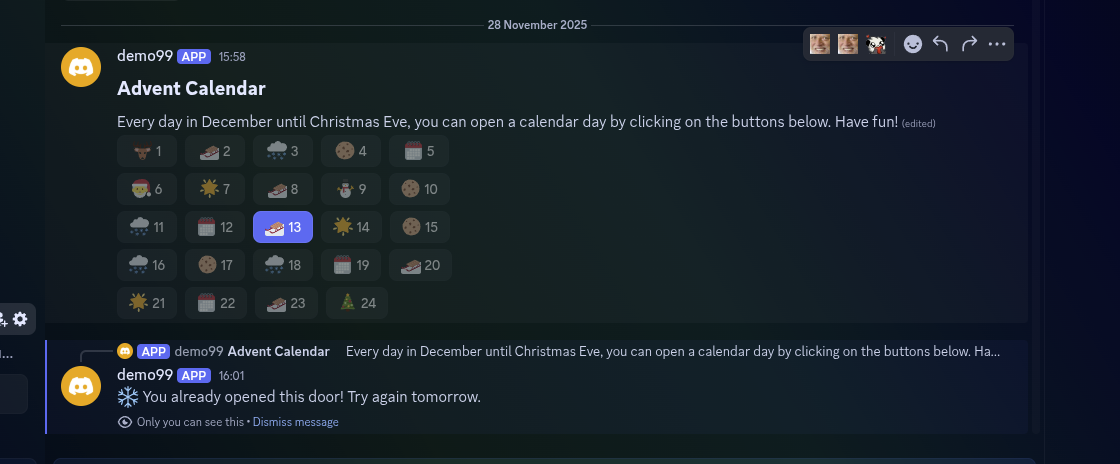
<p>The module allows you to send 24 doors in a channel of your choice. From December 1st to December 24th, members can open today's door every day and find a message designed by you, optionally with a role of your choice. You can hide really anything behind the doors - more on that later.</p>
<h2 class="anchor anchorTargetStickyNavbar_Vzrq" id="️-how-it-works">🛠️ How it works<a href="https://docs.scnx.xyz/blog/2025-winter-holidays/#%EF%B8%8F-how-it-works" class="hash-link" aria-label="Direct link to 🛠️ How it works" title="Direct link to 🛠️ How it works" translate="no">​</a></h2>
<div class="theme-admonition theme-admonition-tip admonition_xJq3 alert alert--success"><div class="admonitionHeading_Gvgb"><span class="admonitionIcon_Rf37"><svg viewBox="0 0 12 16"><path fill-rule="evenodd" d="M6.5 0C3.48 0 1 2.19 1 5c0 .92.55 2.25 1 3 1.34 2.25 1.78 2.78 2 4v1h5v-1c.22-1.22.66-1.75 2-4 .45-.75 1-2.08 1-3 0-2.81-2.48-5-5.5-5zm3.64 7.48c-.25.44-.47.8-.67 1.11-.86 1.41-1.25 2.06-1.45 3.23-.02.05-.02.11-.02.17H5c0-.06 0-.13-.02-.17-.2-1.17-.59-1.83-1.45-3.23-.2-.31-.42-.67-.67-1.11C2.44 6.78 2 5.65 2 5c0-2.2 2.02-4 4.5-4 1.22 0 2.36.42 3.22 1.19C10.55 2.94 11 3.94 11 5c0 .66-.44 1.78-.86 2.48zM4 14h5c-.23 1.14-1.3 2-2.5 2s-2.27-.86-2.5-2z"></path></svg></span>Not with SCNX yet?</div><div class="admonitionContent_BuS1"><p>SCNX is a service where you can create a completely customizable Discord bot for your server without any programming. You can follow <a class="" href="https://docs.scnx.xyz/docs/setup/">these easy instructions</a> to get started right away.</p></div></div>
<ul>
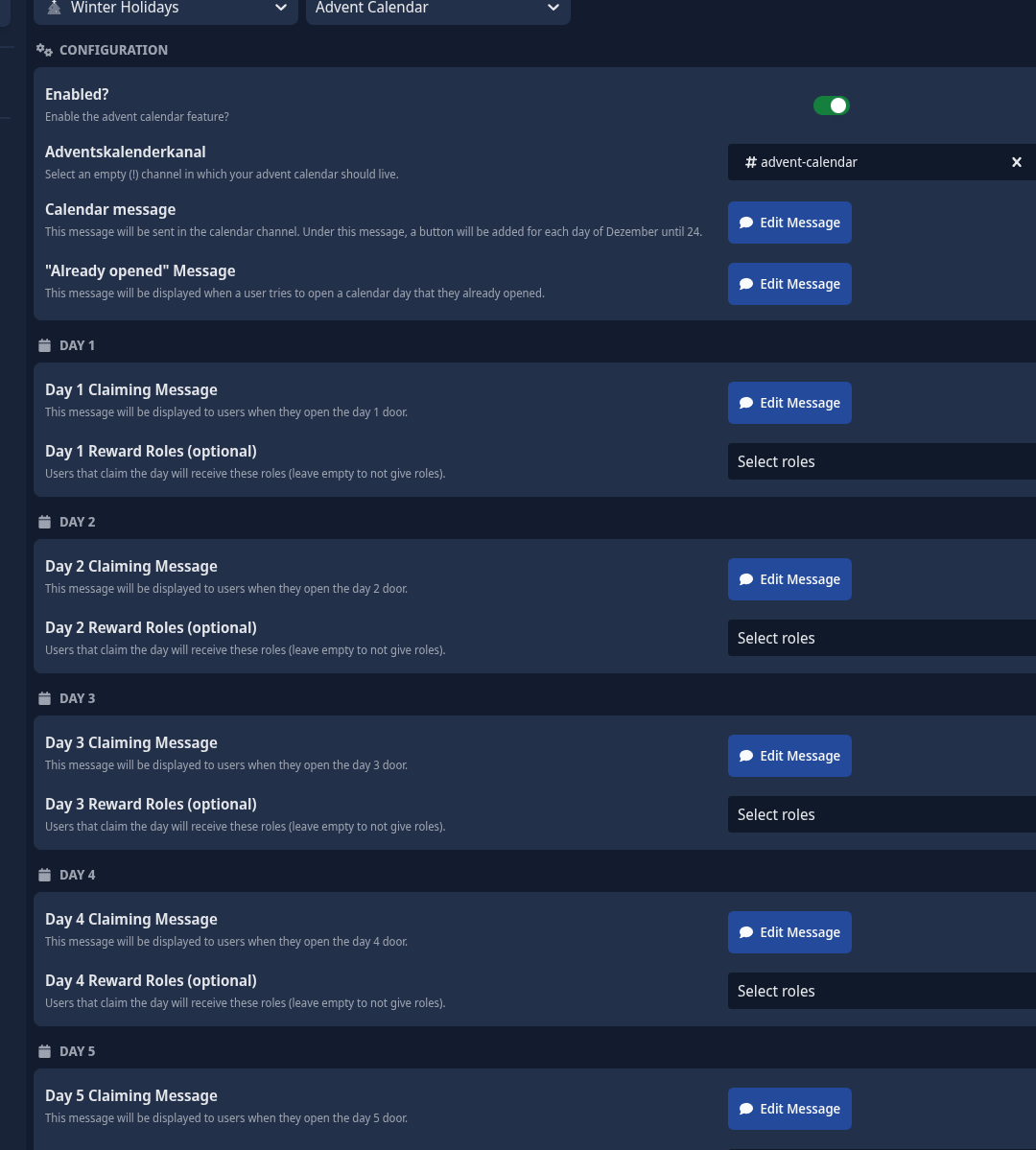
<li class=""><strong>Configure the module:</strong> You define some basic settings and determine what awaits users behind the doors. The module is very easy to understand - should you still have problems, our <a href="https://scnx.app/help" target="_blank" rel="noopener noreferrer" class="">excellent customer support</a> is happy to help.</li>
<li class=""><strong>Your community opens the respective door every day:</strong> Users can interactively open today's door in your advent calendar channel every day. Only then do they receive the message customized by you and possibly more, such as a role.</li>
<li class=""><strong>The interactive advent calendar updates automatically:</strong> Your advent calendar updates automatically every hour - including the current date and other exciting info, e.g. how many users are participating in the advent calendar.</li>
</ul>
<p><span class="testa"> <img decoding="async" loading="lazy" alt="Screenshot showing the advent calendar message in Discord" src="https://docs.scnx.xyz/assets/images/image-3b0779c896e2ff26f7c798e31ac28d42.png" width="1120" height="464" class="img_ev3q"></span>
<span class="testa"> <img decoding="async" loading="lazy" alt="Screenshot showing the configuration options of the module &amp;quot;Winter Holidays&amp;quot; on scnx.app" src="https://docs.scnx.xyz/assets/images/image2-7b72968736cbbb26475f02975e6c0b58.png" width="1080" height="1199" class="img_ev3q"></span></p>
<h2 class="anchor anchorTargetStickyNavbar_Vzrq" id="-why-is-a-virtual-advent-calendar-a-good-idea-for-my-community">❓ Why is a virtual advent calendar a good idea for my community?<a href="https://docs.scnx.xyz/blog/2025-winter-holidays/#-why-is-a-virtual-advent-calendar-a-good-idea-for-my-community" class="hash-link" aria-label="Direct link to ❓ Why is a virtual advent calendar a good idea for my community?" title="Direct link to ❓ Why is a virtual advent calendar a good idea for my community?" translate="no">​</a></h2>
<p>With a virtual advent calendar, you make your server stand out from the crowd while offering your community an exciting event. During this event, users come back to your server every day, so you can expect higher activity. It is also extremely easy to use and create for both your community and you, even though you can customize almost anything.</p>
<h2 class="anchor anchorTargetStickyNavbar_Vzrq" id="-tips-for-an-even-better-event">💡 Tips for an even better event<a href="https://docs.scnx.xyz/blog/2025-winter-holidays/#-tips-for-an-even-better-event" class="hash-link" aria-label="Direct link to 💡 Tips for an even better event" title="Direct link to 💡 Tips for an even better event" translate="no">​</a></h2>
<p>Further tips and tricks, which also go into more detail on the concrete implementation on your server, can be found in our <a href="https://scnx.tips/p/a07bde25-a8e0-49ef-8dcd-d8e018cd264c/" target="_blank" rel="noopener noreferrer" class="">scnx.tips article</a>.</p>
<h2 class="anchor anchorTargetStickyNavbar_Vzrq" id="help">✉️ Questions or Problems?<a href="https://docs.scnx.xyz/blog/2025-winter-holidays/#help" class="hash-link" aria-label="Direct link to ✉️ Questions or Problems?" title="Direct link to ✉️ Questions or Problems?" translate="no">​</a></h2>
<p>You can find more information about the module in the [scnx.tips article](<a href="https://scnx.tips/p/a07bde25-a8e0-49ef-8dcd-d8e018cd264c/" target="_blank" rel="noopener noreferrer" class="">https://scnx.tips/</a>, otherwise we are always happy to help on <a href="https://scnx.app/help" target="_blank" rel="noopener noreferrer" class="">scnx.app/help</a> or directly on <a href="https://scootk.it/dc-en" target="_blank" rel="noopener noreferrer" class="">our Discord</a>.</p>
<p>Make this December an unforgettable experience for your Discord community with an exciting virtual advent calendar powered by SCNX!</p>]]></content>
        <author>
            <name>Fridolin</name>
        </author>
        <category label="Newsletter" term="Newsletter"/>
        <category label="SCNX" term="SCNX"/>
        <category label="Events" term="Events"/>
    </entry>
    <entry>
        <title type="html"><![CDATA[Huge savings with our Black Friday offers!]]></title>
        <id>https://docs.scnx.xyz/blog/2025-black-friday/</id>
        <link href="https://docs.scnx.xyz/blog/2025-black-friday/"/>
        <updated>2025-11-21T10:00:00.000Z</updated>
        <summary type="html"><![CDATA[Your chance to stop up on AI coins, upgrade your server hosting and more.]]></summary>
        <content type="html"><![CDATA[<p>Finally, a sale! We almost never do sales events, so this is your rare chance to save big on SCNX. Whether you are
looking to upgrade your server hosting, stock up on AI coins, or support the development team, now is the time.</p>
<p>But that’s not all - all of our paid plans include our biggest update in our product's history: <strong>Support Bot V3</strong>.</p>
<h2 class="anchor anchorTargetStickyNavbar_Vzrq" id="️-the-scnx-black-friday-sale">🛍️ The SCNX Black Friday Sale<a href="https://docs.scnx.xyz/blog/2025-black-friday/#%EF%B8%8F-the-scnx-black-friday-sale" class="hash-link" aria-label="Direct link to 🛍️ The SCNX Black Friday Sale" title="Direct link to 🛍️ The SCNX Black Friday Sale" translate="no">​</a></h2>
<p><strong>Ends:</strong> December 03 at 11:59 PM.</p>
<p>We have slashed prices across the board. With this sale, our premium plans are cheaper than ever. Here is what you can
grab:</p>
<h3 class="anchor anchorTargetStickyNavbar_Vzrq" id="1-scnx-server-plans-non-auto-renewing">1. SCNX Server Plans (Non-Auto-Renewing)<a href="https://docs.scnx.xyz/blog/2025-black-friday/#1-scnx-server-plans-non-auto-renewing" class="hash-link" aria-label="Direct link to 1. SCNX Server Plans (Non-Auto-Renewing)" title="Direct link to 1. SCNX Server Plans (Non-Auto-Renewing)" translate="no">​</a></h3>
<p>Unlock 24/7 hosting, remove ads, and access powerful features like Custom Commands and Linked Roles.</p>
<p>These plans do <strong>not</strong> auto-renew; they simply expire after the purchased period, so there is no need to worry about canceling.</p>
<ul>
<li class=""><strong>Unlimited (1 Year):</strong> 17% Discount.</li>
<li class=""><strong>Professional (6 Months):</strong> 17% Discount.</li>
<li class=""><strong>Professional (1 Year):</strong> 17% Discount.</li>
</ul>
<p>Lifetime Plans are also on sale! They can be transferred between servers and support the development of SCNX.</p>
<ul>
<li class=""><strong>Unlimited (Lifetime):</strong> 15% Discount.</li>
<li class=""><strong>Professional (Lifetime):</strong> 11% Discount.</li>
</ul>
<p><a href="https://scnx.app/black-friday" target="_blank" rel="noopener noreferrer" class=""><strong>👉 Shop the Black Friday Sale Now</strong></a></p>
<h3 class="anchor anchorTargetStickyNavbar_Vzrq" id="2-ai-coins">2. AI Coins<a href="https://docs.scnx.xyz/blog/2025-black-friday/#2-ai-coins" class="hash-link" aria-label="Direct link to 2. AI Coins" title="Direct link to 2. AI Coins" translate="no">​</a></h3>
<p>Top up once and never worry about it again. Generate more images, chat with AI, and use the new AI ticket transcript
features for less.</p>
<ul>
<li class=""><strong>5,000 Coins:</strong> 11% Discount.</li>
<li class=""><strong>10,000 Coins:</strong> 19% Discount.</li>
<li class=""><strong>50,000 Coins (Best Value):</strong> 28% Discount.</li>
</ul>
<p><a href="https://scnx.app/black-friday" target="_blank" rel="noopener noreferrer" class=""><strong>👉 Shop the Black Friday Sale Now</strong></a></p>
<h3 class="anchor anchorTargetStickyNavbar_Vzrq" id="3-scootkit-memberships">3. ScootKit Memberships<a href="https://docs.scnx.xyz/blog/2025-black-friday/#3-scootkit-memberships" class="hash-link" aria-label="Direct link to 3. ScootKit Memberships" title="Direct link to 3. ScootKit Memberships" translate="no">​</a></h3>
<div class="theme-admonition theme-admonition-info admonition_xJq3 alert alert--info"><div class="admonitionHeading_Gvgb"><span class="admonitionIcon_Rf37"><svg viewBox="0 0 14 16"><path fill-rule="evenodd" d="M7 2.3c3.14 0 5.7 2.56 5.7 5.7s-2.56 5.7-5.7 5.7A5.71 5.71 0 0 1 1.3 8c0-3.14 2.56-5.7 5.7-5.7zM7 1C3.14 1 0 4.14 0 8s3.14 7 7 7 7-3.14 7-7-3.14-7-7-7zm1 3H6v5h2V4zm0 6H6v2h2v-2z"></path></svg></span>Important</div><div class="admonitionContent_BuS1"><p>Memberships do <strong>not</strong> unlock SCNX server features. For server features (like Ad-Free hosting or Support Bot), please
purchase an SCNX Server Plan.</p></div></div>
<p>Support the development of SCNX and get perks like Behind-The-Scenes access.</p>
<ul>
<li class=""><strong>Level 2 (1 Year):</strong> 23% Discount.</li>
<li class=""><strong>Level 3 (6 Months):</strong> 13% Discount.</li>
<li class=""><strong>Level 3 (1 Year):</strong> 34% Discount.</li>
<li class=""><strong>Level 4 (1 Year):</strong> 23% Discount.</li>
</ul>
<p><a href="https://scnx.app/black-friday" target="_blank" rel="noopener noreferrer" class=""><strong>👉 Shop the Black Friday Sale Now</strong></a></p>
<hr>
<h2 class="anchor anchorTargetStickyNavbar_Vzrq" id="-also-included-in-all-plans-the-new-support-bot-v3-beta">🤖 Also included in all plans: The new Support Bot V3 (Beta)<a href="https://docs.scnx.xyz/blog/2025-black-friday/#-also-included-in-all-plans-the-new-support-bot-v3-beta" class="hash-link" aria-label="Direct link to 🤖 Also included in all plans: The new Support Bot V3 (Beta)" title="Direct link to 🤖 Also included in all plans: The new Support Bot V3 (Beta)" translate="no">​</a></h2>
<p>Included with all paid SCNX server plans is the new Support Bot V3. We have rebuilt our system from the ground up.
<strong>"Modmail" is officially becoming "Support-Bot"</strong>.</p>
<p>This update combines the best of both worlds, offering you two ways to handle support:</p>
<ol>
<li class=""><strong>Modmail System (Classic):</strong> The DM-based system you are familiar with.</li>
<li class=""><strong>Ticket System (New!):</strong> A highly-requested channel-based system where tickets are created inside your server.</li>
</ol>
<h3 class="anchor anchorTargetStickyNavbar_Vzrq" id="key-v3-features">Key V3 Features:<a href="https://docs.scnx.xyz/blog/2025-black-friday/#key-v3-features" class="hash-link" aria-label="Direct link to Key V3 Features:" title="Direct link to Key V3 Features:" translate="no">​</a></h3>
<ul>
<li class=""><strong>Ticket System:</strong> Users open tickets via dedicated messages, creating private channels on your server.</li>
<li class=""><strong>AI-Powered Summaries:</strong> Opt-in to generate concise summaries of entire conversations when a ticket is closed, saving
you from reading long logs.</li>
<li class=""><strong>Web-Based Log Viewer:</strong> Say goodbye to plain text files. Logs are now displayed in a beautiful, chat-like web
interface.</li>
<li class=""><strong>Advanced Workflow:</strong> Features include Team Claiming, Multi-User Tickets, Ticket Ratings, and Automatic Inactivity
Closures.</li>
</ul>
<p>Learn more about Support Bot V3 (and learn how to try it) in our <a class="" href="https://docs.scnx.xyz/blog/2025-support-bot-beta/">blog post</a>.</p>
<hr>
<h2 class="anchor anchorTargetStickyNavbar_Vzrq" id="-ready-to-upgrade">💳 Ready to Upgrade?<a href="https://docs.scnx.xyz/blog/2025-black-friday/#-ready-to-upgrade" class="hash-link" aria-label="Direct link to 💳 Ready to Upgrade?" title="Direct link to 💳 Ready to Upgrade?" translate="no">​</a></h2>
<p>Don't miss out—the sale ends on December 3rd!</p>
<p><strong>New Payment Method:</strong> You can now pay using <strong>Paysafecard</strong>! This makes it easier than ever to grab a plan without
needing a credit card or bank account.</p>
<p><a href="https://scnx.app/black-friday" target="_blank" rel="noopener noreferrer" class=""><strong>👉 Shop the Black Friday Sale Now</strong></a></p>]]></content>
        <author>
            <name>Simon</name>
            <email>simon@scootkit.com</email>
            <uri>https://scderox.de</uri>
        </author>
        <category label="Newsletter" term="Newsletter"/>
        <category label="SCNX" term="SCNX"/>
        <category label="Offers" term="Offers"/>
    </entry>
    <entry>
        <title type="html"><![CDATA[Support Bot V3 is now in beta!]]></title>
        <id>https://docs.scnx.xyz/blog/2025-support-bot-beta/</id>
        <link href="https://docs.scnx.xyz/blog/2025-support-bot-beta/"/>
        <updated>2025-10-28T10:00:00.000Z</updated>
        <summary type="html"><![CDATA[Our new Support Bot, previously Modmail, adds support for a ticket system, AI summaries, better logs and much more. And the best news: You can try it yourself in the beta version.]]></summary>
        <content type="html"><![CDATA[<p>We’re excited to announce the biggest update in our product's history, and with it, a brand new name. Modmail is
officially becoming <strong>Support-Bot!</strong></p>
<p>This is more than just a rebrand. For a long time, Modmail has been a powerful tool for DM-based support. But as our
platform has grown, we’ve rebuilt it from the ground up to be a complete support solution. The name "Modmail" simply
didn't cover it anymore.</p>
<p>Today, we're launching the <strong>V3 Beta</strong>, which is now available to everyone. This update introduces our single
most-requested feature: a comprehensive <strong>Ticket System</strong> that lives right inside your server.</p>
<h2 class="anchor anchorTargetStickyNavbar_Vzrq" id="rebrand">"Modmail" + "Tickets" = Support-Bot<a href="https://docs.scnx.xyz/blog/2025-support-bot-beta/#rebrand" class="hash-link" aria-label="Direct link to &quot;Modmail&quot; + &quot;Tickets&quot; = Support-Bot" title="Direct link to &quot;Modmail&quot; + &quot;Tickets&quot; = Support-Bot" translate="no">​</a></h2>
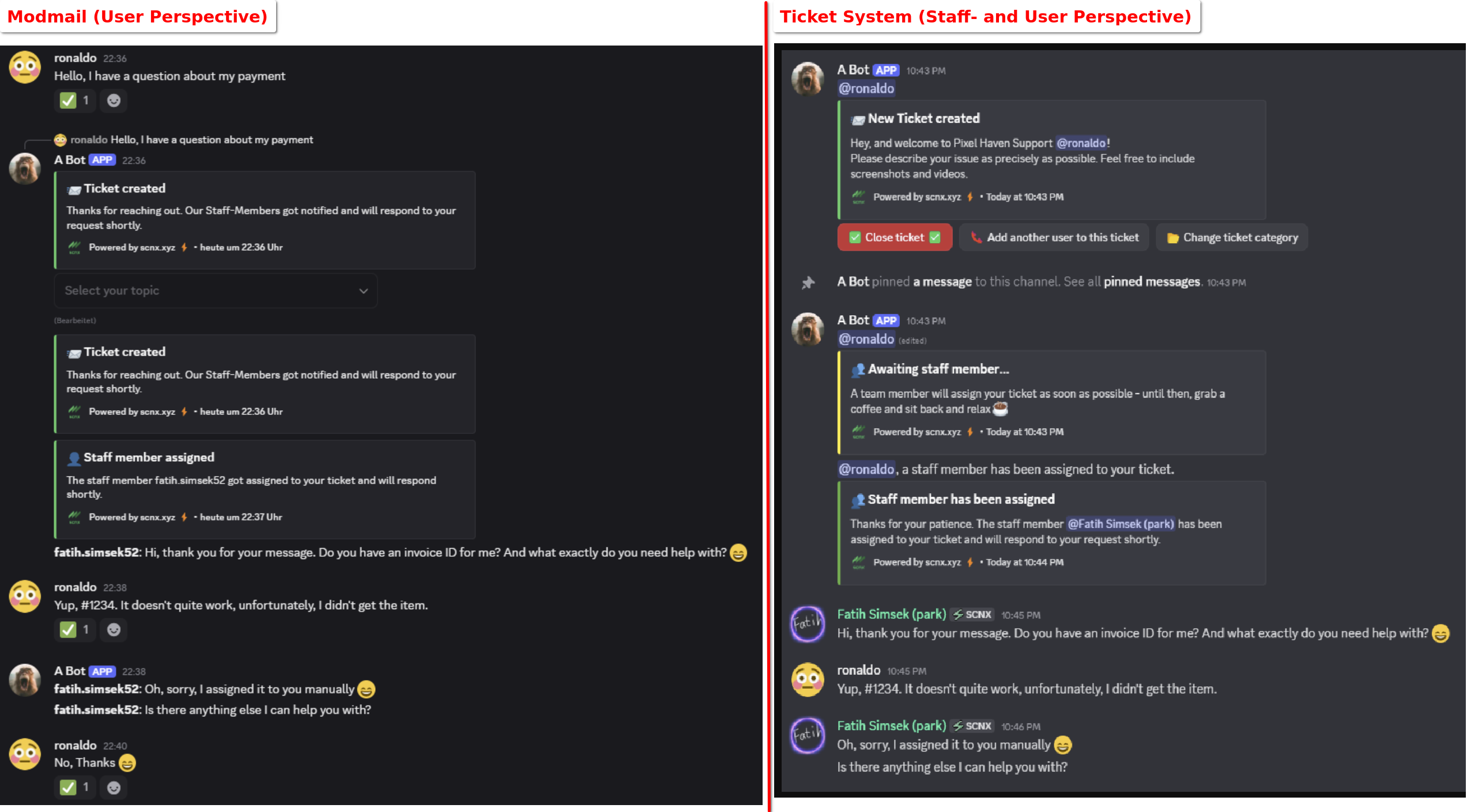
<p>With V3, Support-Bot now gives you two powerful ways to handle support, which you can use separately or at the same
time:</p>
<ol>
<li class=""><strong>Modmail System (Classic):</strong> The DM-based system you're familiar with. Users send a DM to the bot, and your team
manages it in a private thread.</li>
<li class=""><strong>Ticket System (New!):</strong> A highly-requested, channel-based system. Users open a ticket via a dedicated message, and
a private channel is created for them <em>inside</em> your server.</li>
</ol>
<p>This update is all about giving you the flexibility to build the perfect support experience for your community.</p>
<p><span class="testa"> <img decoding="async" loading="lazy" alt="Screenshot showing the Modmail feature on the right from the user perspective and the ticket system feature from the left" src="https://docs.scnx.xyz/assets/images/1-1168fd53ec0e17917adbe275fc6c7378.png" width="2545" height="1409" class="img_ev3q"></span></p>
<h2 class="anchor anchorTargetStickyNavbar_Vzrq" id="ticket-system">The All-New Ticket System: A Deeper Dive<a href="https://docs.scnx.xyz/blog/2025-support-bot-beta/#ticket-system" class="hash-link" aria-label="Direct link to The All-New Ticket System: A Deeper Dive" title="Direct link to The All-New Ticket System: A Deeper Dive" translate="no">​</a></h2>
<p>This is the star of the show. The new Ticket System is built for flexibility, power, and professional support workflows.
It moves support out of DMs and into private channels right on your server.</p>
<h3 class="anchor anchorTargetStickyNavbar_Vzrq" id="ticket-system-advanced-topics">🏷️ Advanced Ticket Topics<a href="https://docs.scnx.xyz/blog/2025-support-bot-beta/#ticket-system-advanced-topics" class="hash-link" aria-label="Direct link to 🏷️ Advanced Ticket Topics" title="Direct link to 🏷️ Advanced Ticket Topics" translate="no">​</a></h3>
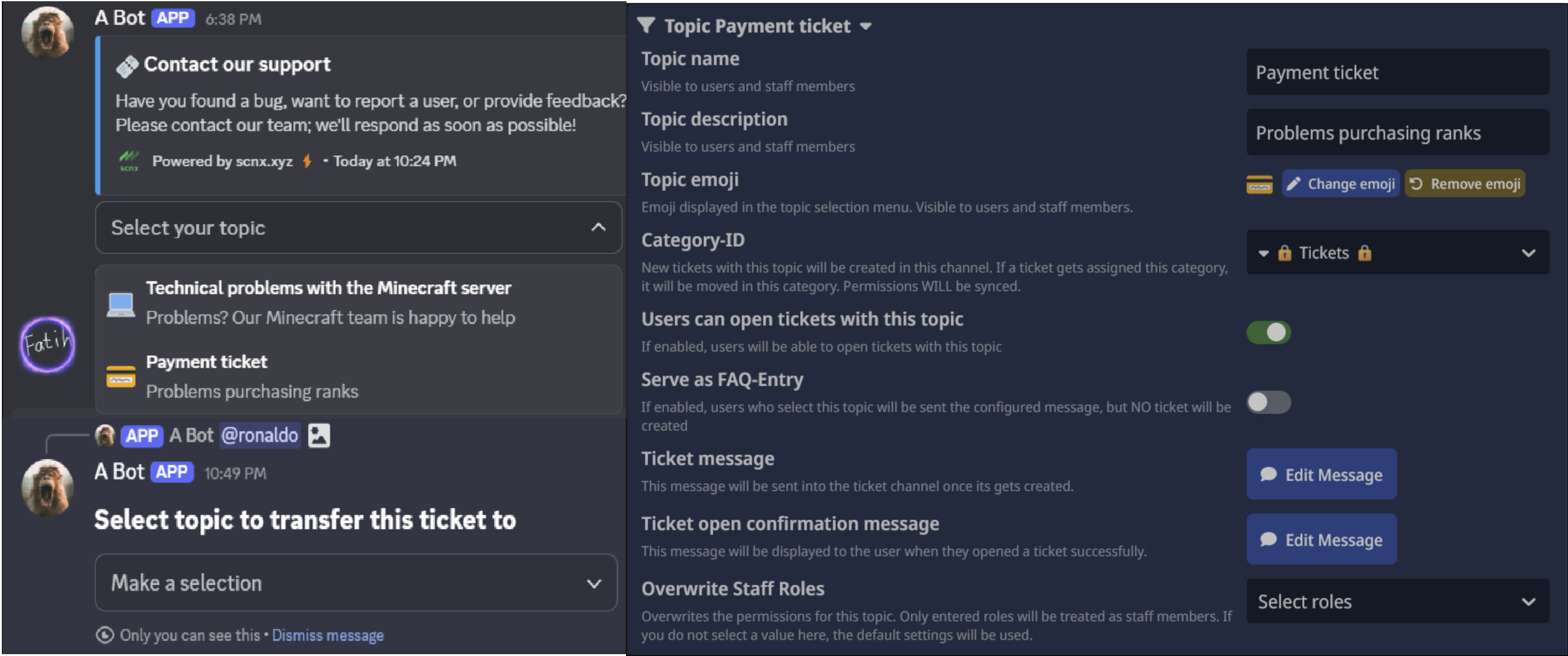
<p>Ticket Topics are now fully integrated into the new system. You can set different topics for each ticket panel, helping
you categorize and route requests from the moment they're created. Even better, you can enable in-channel buttons to
allow your team to change a ticket's topic <em>after</em> it's been opened, ensuring everything stays organized.</p>
<p><span class="testa"> <img decoding="async" loading="lazy" alt="Screenshot showing a ticket selection embed, showing how to move a ticket and the ticket topics configuration" src="https://docs.scnx.xyz/assets/images/2-cd0c48e52edb223a18d1f0e370b211a3.png" width="2530" height="1058" class="img_ev3q"></span></p>
<h3 class="anchor anchorTargetStickyNavbar_Vzrq" id="ticket-system-claiming">🙋 Team Claiming System<a href="https://docs.scnx.xyz/blog/2025-support-bot-beta/#ticket-system-claiming" class="hash-link" aria-label="Direct link to 🙋 Team Claiming System" title="Direct link to 🙋 Team Claiming System" translate="no">​</a></h3>
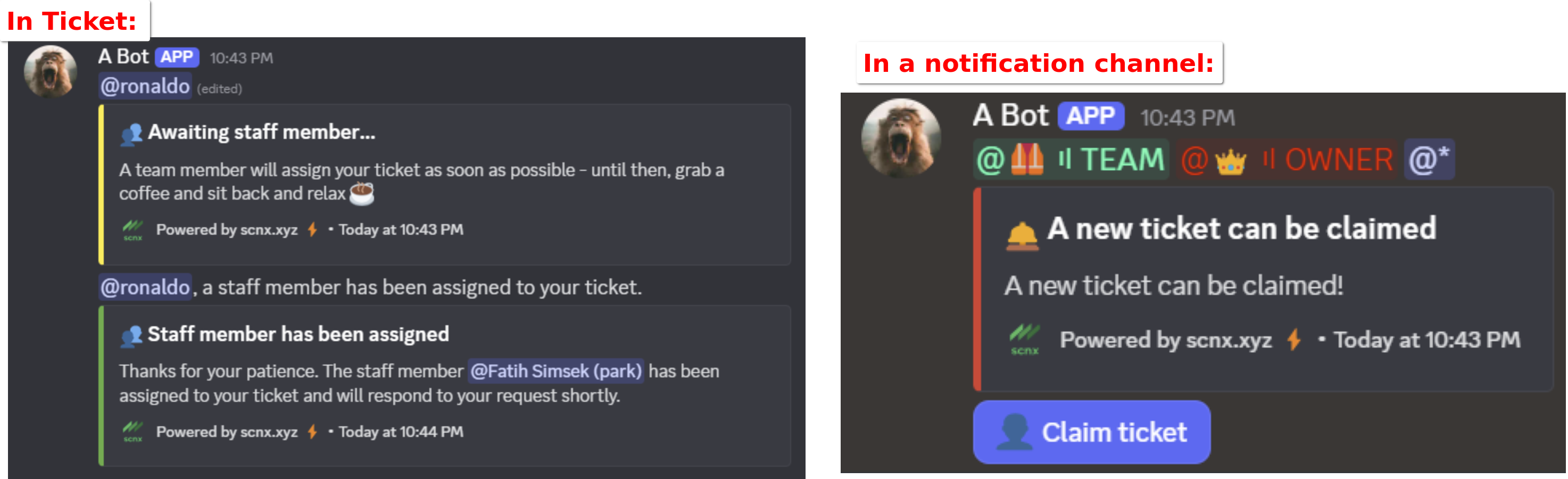
<p>Empower your staff to manage incoming requests efficiently. New tickets can be announced in a dedicated notification
channel. Team members can then "claim" and assign themselves to tickets, fostering accountability and reducing response
times.</p>
<p><span class="testa"> <img decoding="async" loading="lazy" alt="A screenshot showing claiming status messages and how to claim a ticket" src="https://docs.scnx.xyz/assets/images/claiming-8ab7754967db4579b7ceb7ef177cf580.png" width="2947" height="900" class="img_ev3q"></span></p>
<h3 class="anchor anchorTargetStickyNavbar_Vzrq" id="ticket-system-multiple-users">👥 Multi-User Tickets &amp; Multiple Tickets Per User<a href="https://docs.scnx.xyz/blog/2025-support-bot-beta/#ticket-system-multiple-users" class="hash-link" aria-label="Direct link to 👥 Multi-User Tickets &amp; Multiple Tickets Per User" title="Direct link to 👥 Multi-User Tickets &amp; Multiple Tickets Per User" translate="no">​</a></h3>
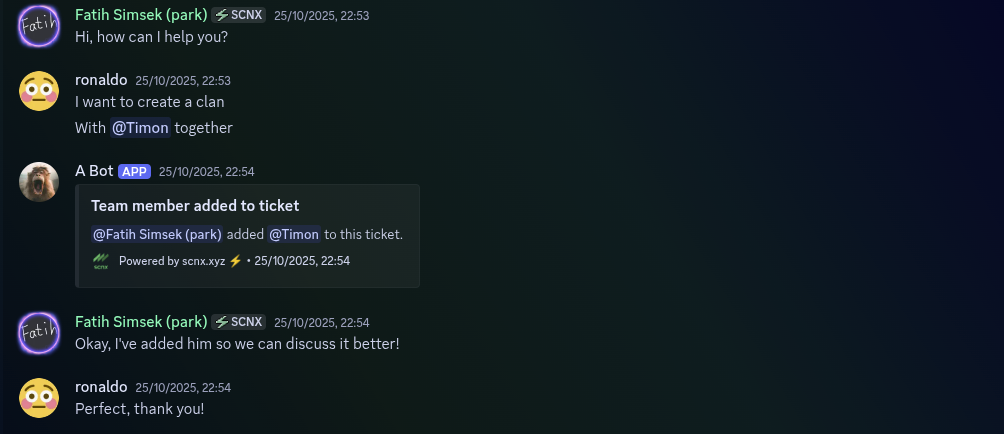
<p>Flexibility is key. A single user can now open multiple tickets simultaneously. Additionally, you can (optionally) allow
users to add <em>other</em> server members to their ticket, making it perfect for group support scenarios or collaborative
problem-solving.</p>
<p><span class="testa"> <img decoding="async" loading="lazy" alt="A screenshot showing how to add another user to a ticket" src="https://docs.scnx.xyz/assets/images/multi-users-0653b740d4937bfb4cf688ca2aca058b.png" width="1004" height="434" class="img_ev3q"></span></p>
<h3 class="anchor anchorTargetStickyNavbar_Vzrq" id="ticket-system-ticket-closing">⏰ Automatic Inactivity Reminders &amp; Closures<a href="https://docs.scnx.xyz/blog/2025-support-bot-beta/#ticket-system-ticket-closing" class="hash-link" aria-label="Direct link to ⏰ Automatic Inactivity Reminders &amp; Closures" title="Direct link to ⏰ Automatic Inactivity Reminders &amp; Closures" translate="no">​</a></h3>
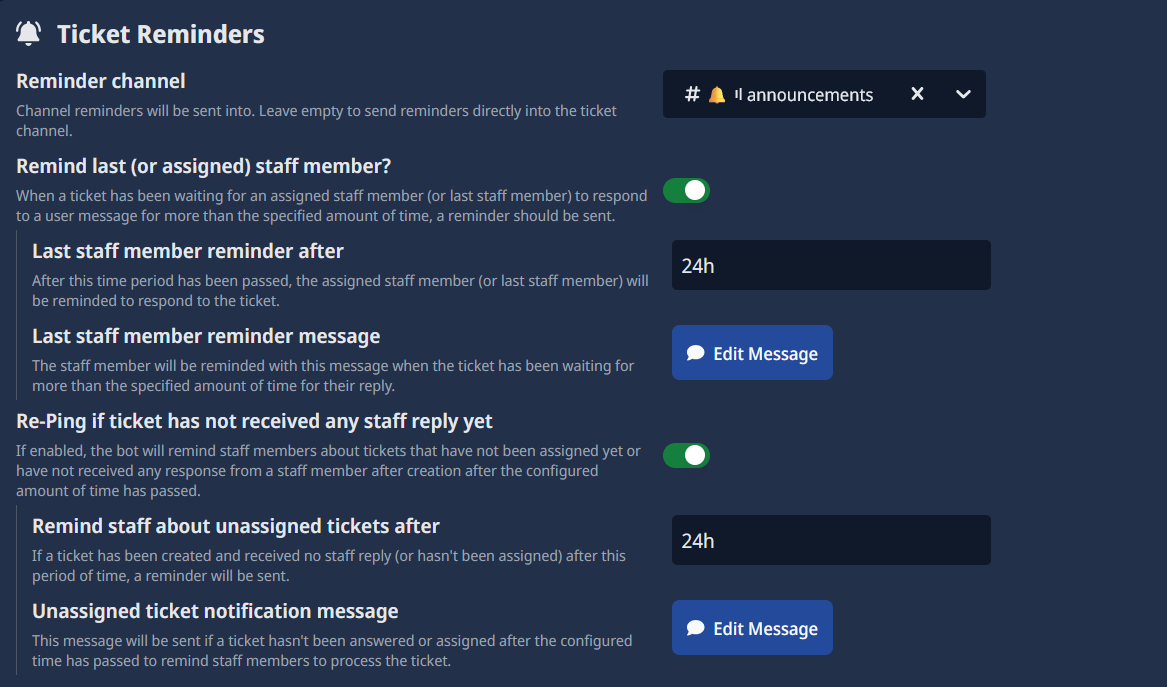
<p>Keep your queue clean and efficient. Configure the bot to gently nudge users in idle tickets. If a ticket remains
inactive for too long, you can have Support-Bot automatically close it, ensuring only active conversations take up your
team's time.</p>
<p><span class="testa"> <img decoding="async" loading="lazy" alt="A screenshot showing the configuration of closing tickets" src="https://docs.scnx.xyz/assets/images/autoclose-833d6f87f5fb99f698f824ffca9f4b37.png" width="1167" height="687" class="img_ev3q"></span></p>
<h3 class="anchor anchorTargetStickyNavbar_Vzrq" id="ticket-system-reviews">⭐ Ticket Ratings &amp; Reviews<a href="https://docs.scnx.xyz/blog/2025-support-bot-beta/#ticket-system-reviews" class="hash-link" aria-label="Direct link to ⭐ Ticket Ratings &amp; Reviews" title="Direct link to ⭐ Ticket Ratings &amp; Reviews" translate="no">​</a></h3>
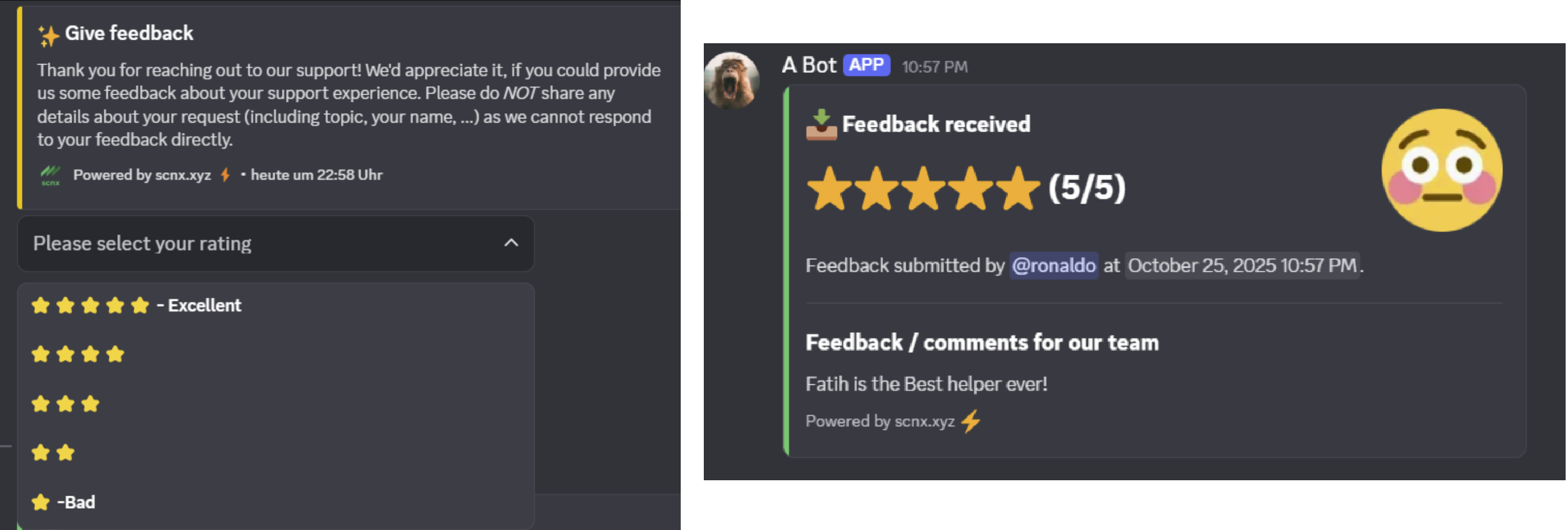
<p>Gathering feedback is essential. The 5-star rating system is now available for the Ticket System! When a ticket is
closed, the user can rate their experience, giving you valuable insight into your team's performance.</p>
<p><span class="testa"> <img decoding="async" loading="lazy" alt="A screenshot showing how users can give reviews and how review messages get sent into a staff channel" src="https://docs.scnx.xyz/assets/images/reviews-000fe934f3d4549120769a19ed4b8ad0.png" width="2649" height="895" class="img_ev3q"></span></p>
<h3 class="anchor anchorTargetStickyNavbar_Vzrq" id="ticket-system-opening-messages">✨ Unlimited, Smart Ticket Opening Messages<a href="https://docs.scnx.xyz/blog/2025-support-bot-beta/#ticket-system-opening-messages" class="hash-link" aria-label="Direct link to ✨ Unlimited, Smart Ticket Opening Messages" title="Direct link to ✨ Unlimited, Smart Ticket Opening Messages" translate="no">​</a></h3>
<p>Create as many "Open a Ticket" panels as you need, placing them in different channels with unique topics and
permissions. The system is smart: if you have fewer than five ticket topics for a panel, it will automatically display
them as clean, simple buttons instead of a dropdown menu, making interaction even faster.</p>
<p><span class="testa"> <img decoding="async" loading="lazy" alt="A screenshot showing different opening message configurations in Discord" src="https://docs.scnx.xyz/assets/images/open-message-7c45b8ede5bd9a9a603d1a4f70759972.png" width="3979" height="1215" class="img_ev3q"></span></p>
<h2 class="anchor anchorTargetStickyNavbar_Vzrq" id="combined">Game-Changing Features for BOTH Systems<a href="https://docs.scnx.xyz/blog/2025-support-bot-beta/#combined" class="hash-link" aria-label="Direct link to Game-Changing Features for BOTH Systems" title="Direct link to Game-Changing Features for BOTH Systems" translate="no">​</a></h2>
<p>We didn't just add a new system; we supercharged the entire platform. These new features are available for <em>both</em> the
Modmail and Ticket systems.</p>
<h3 class="anchor anchorTargetStickyNavbar_Vzrq" id="combined-ai-summaries">✨ AI-Powered Ticket Summaries<a href="https://docs.scnx.xyz/blog/2025-support-bot-beta/#combined-ai-summaries" class="hash-link" aria-label="Direct link to ✨ AI-Powered Ticket Summaries" title="Direct link to ✨ AI-Powered Ticket Summaries" translate="no">​</a></h3>
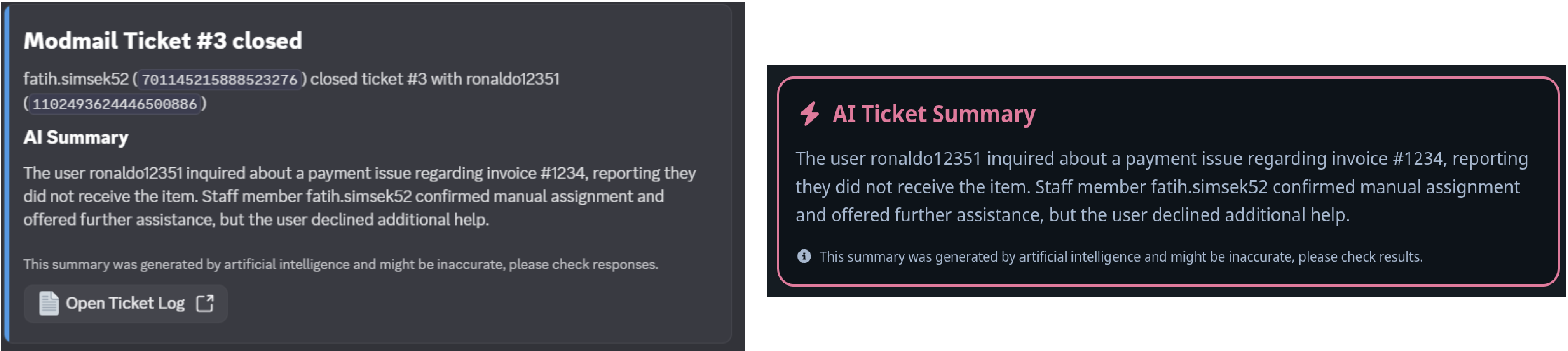
<p>This is a game-changer. Instead of reading through a 200-message log, our new <strong>(opt-in) AI summary feature</strong> will
generate a concise summary of the entire conversation when a ticket is closed. You can understand the user's problem and
the team's solution in seconds.</p>
<p><span class="testa"> <img decoding="async" loading="lazy" alt="Screenshot of an AI summary of a ticket" src="https://docs.scnx.xyz/assets/images/ai-summary-c1ee5056914808e0fa9d66a342097bf6.png" width="4035" height="904" class="img_ev3q"></span></p>
<h3 class="anchor anchorTargetStickyNavbar_Vzrq" id="combined-modmail-net">✨ A New Web-Based Log Viewer<a href="https://docs.scnx.xyz/blog/2025-support-bot-beta/#combined-modmail-net" class="hash-link" aria-label="Direct link to ✨ A New Web-Based Log Viewer" title="Direct link to ✨ A New Web-Based Log Viewer" translate="no">​</a></h3>
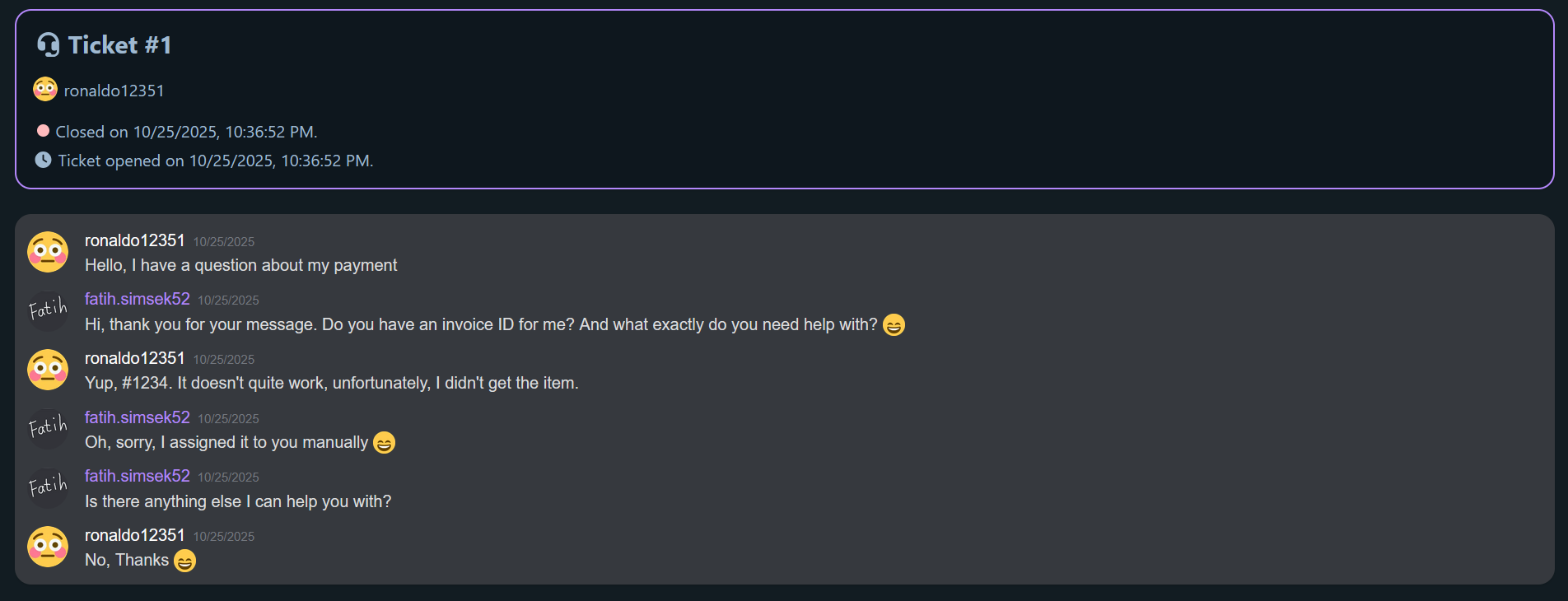
<p>Say goodbye to boring <code>.txt</code> files! We've built a beautiful new web-based log viewer. Logs are now displayed in a clean,
chat-like interface that's easy to read, search, and share. You can also see
a <a href="https://logs.modmail.net/logs/session/019a1d38-a88e-7462-97a3-1a5ceca7fabe#c34b0c34cf26a5c569da6089fe9aa40513ec7882436849e060cd523f6647030f" target="_blank" rel="noopener noreferrer" class="">live example in action</a>.</p>
<p><span class="testa"> <img decoding="async" loading="lazy" alt="Screenshot showing a ticket on our web-based ticket log viewer" src="https://docs.scnx.xyz/assets/images/modmail-net-75ef46c8deab98ccf1df06f8e415daeb.png" width="1904" height="730" class="img_ev3q"></span></p>
<h3 class="anchor anchorTargetStickyNavbar_Vzrq" id="combined-dynamic-names">✨ Dynamic Channel Naming<a href="https://docs.scnx.xyz/blog/2025-support-bot-beta/#combined-dynamic-names" class="hash-link" aria-label="Direct link to ✨ Dynamic Channel Naming" title="Direct link to ✨ Dynamic Channel Naming" translate="no">​</a></h3>
<p>You can now configure ticket topics to automatically override the channel name format. This means you can instantly
identify a ticket's purpose just by its name!</p>
<p>For example:</p>
<ul>
<li class=""><code>❗-ticket-123</code> for a Bug Report</li>
<li class=""><code>⭐-ticket-219</code> for a Partnership</li>
</ul>
<h3 class="anchor anchorTargetStickyNavbar_Vzrq" id="combined-more-v3">More Powerful Tools for V3:<a href="https://docs.scnx.xyz/blog/2025-support-bot-beta/#combined-more-v3" class="hash-link" aria-label="Direct link to More Powerful Tools for V3:" title="Direct link to More Powerful Tools for V3:" translate="no">​</a></h3>
<ul>
<li class=""><strong>Combined Statistics:</strong> The dashboard now features a combined overview, showing stats for Modmail and Tickets,
side-by-side.</li>
<li class=""><strong>Ticket History:</strong> A new <code>/ticket-history</code> command allows you to easily view a user's past support tickets.</li>
<li class=""><strong>Ticket Renaming:</strong> Team members can now rename tickets for better organization.</li>
<li class=""><strong>Custom Ticket IDs:</strong> Change the format of your ticket IDs, adding prefixes or using random IDs instead of sequential
numbers.</li>
<li class=""><strong>Holiday Importing:</strong> Easily import your local holidays to manage your team's availability.</li>
</ul>
<h2 class="anchor anchorTargetStickyNavbar_Vzrq" id="modmail">Upgrades to the Classic Modmail System<a href="https://docs.scnx.xyz/blog/2025-support-bot-beta/#modmail" class="hash-link" aria-label="Direct link to Upgrades to the Classic Modmail System" title="Direct link to Upgrades to the Classic Modmail System" translate="no">​</a></h2>
<p>We haven't forgotten our Modmail roots! The classic DM system also got some fantastic new features:</p>
<ul>
<li class=""><strong>Advanced Info Messages:</strong> You can now set up <em>multiple</em> info messages and configure them to only display for
specific ticket topics. If a topic has only one option, the dropdown automatically becomes a simple button. (Note: If
you had a V2 info message, you will need to set it up again in the new, more powerful system).</li>
<li class=""><strong>Topic Statistics:</strong> The statistics tab now shows your most-used ticket topics, helping you understand what your
users need most.</li>
<li class=""><strong>Customizable Rating Messages:</strong> The team rating messages at the end of a ticket have been improved and can now be
fully customized.</li>
</ul>
<h2 class="anchor anchorTargetStickyNavbar_Vzrq" id="get-today">Get Support-Bot Today<a href="https://docs.scnx.xyz/blog/2025-support-bot-beta/#get-today" class="hash-link" aria-label="Direct link to Get Support-Bot Today" title="Direct link to Get Support-Bot Today" translate="no">​</a></h2>
<div class="theme-admonition theme-admonition-warning admonition_xJq3 alert alert--warning"><div class="admonitionHeading_Gvgb"><span class="admonitionIcon_Rf37"><svg viewBox="0 0 16 16"><path fill-rule="evenodd" d="M8.893 1.5c-.183-.31-.52-.5-.887-.5s-.703.19-.886.5L.138 13.499a.98.98 0 0 0 0 1.001c.193.31.53.501.886.501h13.964c.367 0 .704-.19.877-.5a1.03 1.03 0 0 0 .01-1.002L8.893 1.5zm.133 11.497H6.987v-2.003h2.039v2.003zm0-3.004H6.987V5.987h2.039v4.006z"></path></svg></span>warning</div><div class="admonitionContent_BuS1"><p>Please note that Support Bot V3 is a Beta version and can be unstable. Once switched, you can't switch back. Please use
at your own risk and let us know your
feedback or any issues in our <a href="https://scnx.app/help" target="_blank" rel="noopener noreferrer" class="">customer support</a>.</p></div></div>
<p>This massive update is available right now in the Beta version. Please note that the Support-Bot is included in all our
paid plans, with the <a class="" href="https://docs.scnx.xyz/docs/scnx/guilds/plans/">Unlimited plan</a>
starting at just <!-- -->€4.99<!-- --> <!-- -->/ month<!-- --> (or <!-- -->€53.89<!-- --> <!-- -->/ year<!-- -->), but
pricing might differ outside the European Union based on your region.</p>
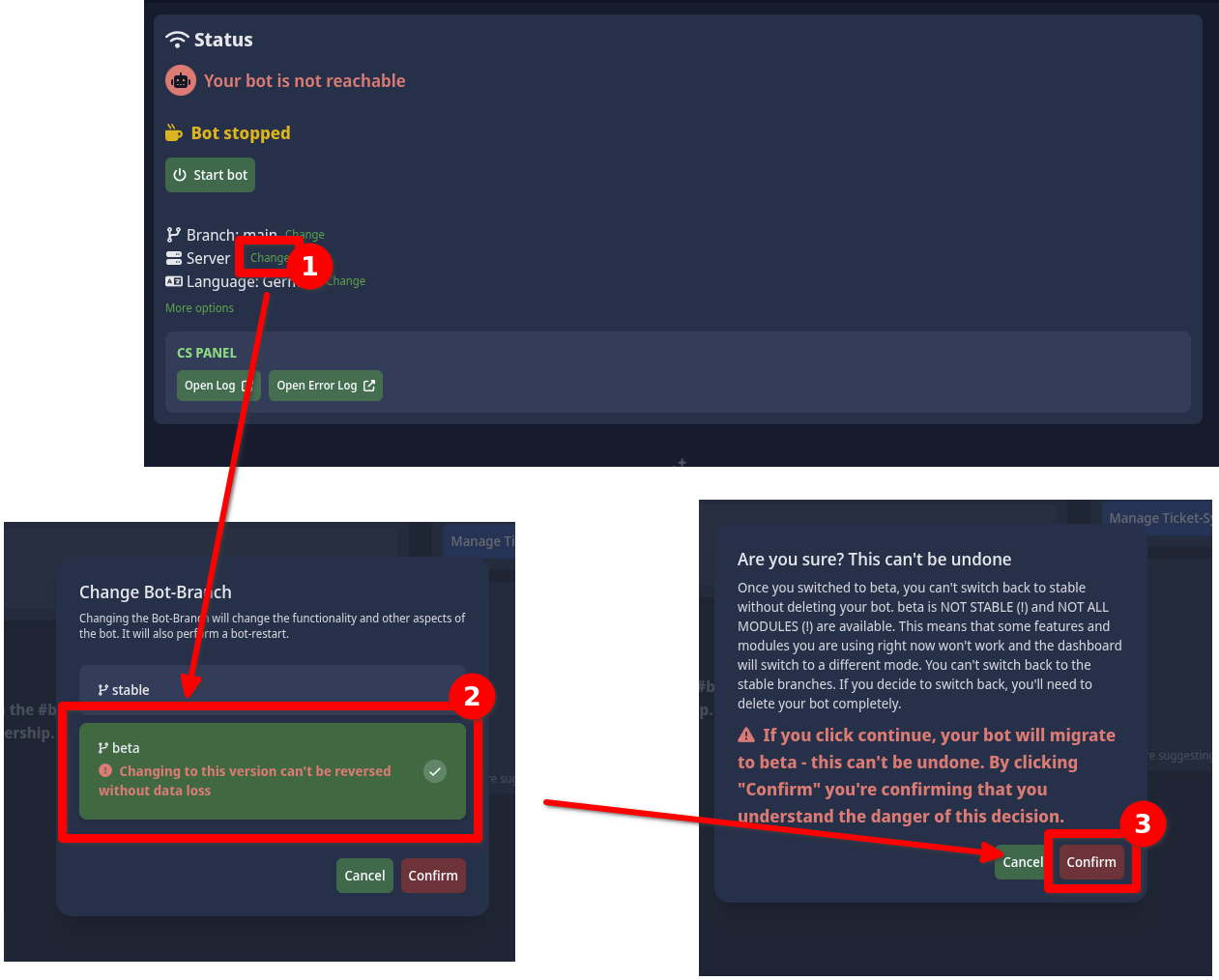
<p>To switch to the new Support-Bot V3, follow these instructions:</p>
<ol>
<li class="">Open our <a href="https://scnx.app/glink?page=support-system/manage" target="_blank" rel="noopener noreferrer" class="">Modmail Dashboard</a>.</li>
<li class="">Click on "Change" next to the displayed branch.</li>
<li class="">Select the Beta branch.</li>
<li class="">Click on "Confirm" to confirm the switch and to acknowledge that you can't switch back to the old version.</li>
<li class="">The migration will now start. This might take a few minutes, please be patient. If you run into issues, please wait a few minutes and reload the page. If that doesn't help, please <a href="https://scnx.app/help" target="_blank" rel="noopener noreferrer" class="">contact our customer support</a>.</li>
</ol>
<p><span class="testa"> <img decoding="async" loading="lazy" alt="Screenshot showing a ticket on our web-based ticket log viewer" src="https://docs.scnx.xyz/assets/images/switch-beta-7713705fc2a4d9d9a7347ba7202390f6.png" width="1261" height="1014" class="img_ev3q"></span></p>]]></content>
        <author>
            <name>Simon</name>
            <email>simon@scootkit.com</email>
            <uri>https://scderox.de</uri>
        </author>
        <category label="Newsletter" term="Newsletter"/>
        <category label="SCNX" term="SCNX"/>
        <category label="Support Bot" term="Support Bot"/>
        <category label="Modmail" term="Modmail"/>
    </entry>
    <entry>
        <title type="html"><![CDATA[Level Up Your Discord: Introducing SCNX Linked Roles]]></title>
        <id>https://docs.scnx.xyz/blog/2025-linked-roles-release/</id>
        <link href="https://docs.scnx.xyz/blog/2025-linked-roles-release/"/>
        <updated>2025-07-27T10:00:00.000Z</updated>
        <summary type="html"><![CDATA[Easily boost your Discord server's professionalism with SCNX Linked Roles. Add official 'Admin' or 'Moderator' tags next to usernames to build trust and improve user experience. Learn how our simple, no-code setup can upgrade your community in minutes.]]></summary>
        <content type="html"><![CDATA[<p>In any active Discord server, clarity is key. How can members instantly recognize staff in a busy chat? SCNX is thrilled
to introduce <a class="" href="https://docs.scnx.xyz/docs/linked-roles/intro/"><strong>Linked Roles</strong></a>, a powerful feature that displays a user's most important
role—like "Admin" or "Moderator"
—as an official tag right next to their username in every message. This is more than a cosmetic update; it's a
fundamental upgrade that brings immediate authority, trust, and professionalism to your community's conversations.</p>
<h2 class="anchor anchorTargetStickyNavbar_Vzrq" id="strategic-advantages">The Strategic Advantage of Linked Roles<a href="https://docs.scnx.xyz/blog/2025-linked-roles-release/#strategic-advantages" class="hash-link" aria-label="Direct link to The Strategic Advantage of Linked Roles" title="Direct link to The Strategic Advantage of Linked Roles" translate="no">​</a></h2>
<p>Linked Roles transform a simple permission set into a dynamic tool for community management.</p>
<ul>
<li class=""><strong>Instant Authority and Trust:</strong> A visible tag like "Moderator" immediately gives weight to a user's message, making
moderation and official announcements more effective without members needing to check a profile.</li>
<li class=""><strong>A Polished, Organized Look:</strong> Clearly identified staff and key members make a server feel more curated and
professional, helping to attract and retain users who value structure.</li>
<li class=""><strong>Enhanced Member Recognition:</strong> Use Linked Roles to publicly reward valuable members with tags like "VIP"
or "Contributor", creating a powerful incentive for others to engage more deeply with the community.</li>
</ul>
<h2 class="anchor anchorTargetStickyNavbar_Vzrq" id="scnx-features">The SCNX Advantage: Powerfully Simple<a href="https://docs.scnx.xyz/blog/2025-linked-roles-release/#scnx-features" class="hash-link" aria-label="Direct link to The SCNX Advantage: Powerfully Simple" title="Direct link to The SCNX Advantage: Powerfully Simple" translate="no">​</a></h2>
<p>SCNX has engineered Linked Roles to be flexible and user-friendly, removing the technical barriers typically associated
with this feature.</p>
<ul>
<li class=""><strong>No-Code Setup:</strong> While setting up linked roles can be complex through Discord's developer tools, SCNX provides an
intuitive dashboard that guides you through the process in minutes, no coding required.</li>
<li class=""><strong>Deep Customization:</strong> <a class="" href="https://docs.scnx.xyz/docs/linked-roles/settings/#authorization-page">Tailor the user authorization page</a> with
over 30 themes and custom branding to match your
server's aesthetic. The page also supports multiple languages automatically. For a fully integrated feel, the
<a class="" href="https://docs.scnx.xyz/docs/scnx/guilds/plans/">Professional Plan</a> allows for the removal of SCNX branding.</li>
<li class=""><strong>Flexible Management:</strong> Easily <a class="" href="https://docs.scnx.xyz/docs/linked-roles/user-management/">assign or remove roles from the SCNX dashboard</a>. A
unique <a class="" href="https://docs.scnx.xyz/docs/linked-roles/role-management/#public-roles">"Public Role"</a> option allows
any server member to claim a specific role, streamlining onboarding for roles like "Verified Member".</li>
<li class=""><strong>Dedicated Support:</strong> Get expert help with any questions on the <a href="https://scnx.app/" target="_blank" rel="noopener noreferrer" class="">official SCNX Discord server</a>,
with support available
in English and German.</li>
</ul>
<h2 class="anchor anchorTargetStickyNavbar_Vzrq" id="setup">A Quick Guide to Implementation<a href="https://docs.scnx.xyz/blog/2025-linked-roles-release/#setup" class="hash-link" aria-label="Direct link to A Quick Guide to Implementation" title="Direct link to A Quick Guide to Implementation" translate="no">​</a></h2>
<p>The SCNX dashboard makes the setup process straightforward.</p>
<h3 class="anchor anchorTargetStickyNavbar_Vzrq" id="requirements">Prerequisites<a href="https://docs.scnx.xyz/blog/2025-linked-roles-release/#requirements" class="hash-link" aria-label="Direct link to Prerequisites" title="Direct link to Prerequisites" translate="no">​</a></h3>
<ul>
<li class="">Your server must be on a paid SCNX plan (<a class="" href="https://docs.scnx.xyz/docs/scnx/guilds/plans/">Unlimited</a>
or <a class="" href="https://docs.scnx.xyz/docs/scnx/guilds/plans/">Professional</a>) or have an active free trial.</li>
<li class="">You are the owner, a <a class="" href="https://docs.scnx.xyz/docs/scnx/guilds/trusted-admins/">trusted admin with the Co-Owner permission</a> or an
administrator of the server you want to enable this feature.</li>
<li class="">Set aside 5-10 minutes to complete the process.</li>
</ul>
<h3 class="anchor anchorTargetStickyNavbar_Vzrq" id="setup">Setup Overview<a href="https://docs.scnx.xyz/blog/2025-linked-roles-release/#setup" class="hash-link" aria-label="Direct link to Setup Overview" title="Direct link to Setup Overview" translate="no">​</a></h3>
<ol>
<li class=""><strong>Connect SCNX and Discord:</strong> The SCNX dashboard will guide you through creating a Discord Application and securely
linking it to the SCNX platform.</li>
<li class=""><strong>Create and Link Your Role:</strong>
First, <a class="" href="https://docs.scnx.xyz/docs/linked-roles/role-management/#create-linked-scnx-role">create the Linked Role in your SCNX dashboard</a>.
Then, create a corresponding
standard role in your Discord server's settings. In that role's "Links" tab, <a class="" href="https://docs.scnx.xyz/docs/linked-roles/role-management/#linked-role-on-discord">add a requirement and select your
application</a> and the role you just created.</li>
<li class=""><strong>Ensure Visibility:</strong> For the role tag to appear in chat, you must go into the Channel Settings <a class="" href="https://docs.scnx.xyz/docs/linked-roles/role-management/#display-in-chat">for every relevant
channel, add the new role, and grant it the "View Channel" permission</a>.</li>
</ol>
<h2 class="anchor anchorTargetStickyNavbar_Vzrq" id="easy-setup">The Seamless Member Experience<a href="https://docs.scnx.xyz/blog/2025-linked-roles-release/#easy-setup" class="hash-link" aria-label="Direct link to The Seamless Member Experience" title="Direct link to The Seamless Member Experience" translate="no">​</a></h2>
<p>Claiming a role <a class="" href="https://docs.scnx.xyz/docs/linked-roles/claim-roles/">is simple for your members</a>. They just click the server name, select "Linked Roles," and choose the role
they wish to claim. This directs them to the custom authorization page. After a one-time approval, they can claim any
future roles without repeating the process. Members can also easily remove the role tag themselves from their server
profile.</p>
<h2 class="anchor anchorTargetStickyNavbar_Vzrq" id="complete">Redefine Your Server's Identity Today<a href="https://docs.scnx.xyz/blog/2025-linked-roles-release/#complete" class="hash-link" aria-label="Direct link to Redefine Your Server's Identity Today" title="Direct link to Redefine Your Server's Identity Today" translate="no">​</a></h2>
<p>SCNX Linked Roles offer the easiest way to bring a new level of professionalism and clarity to your Discord server. By
providing instant visual recognition for staff and key members, this feature builds trust and creates a more organized
community experience.</p>
<p>If you're on the SCNX Unlimited or Professional plan, this feature is available now. Log in to your dashboard to begin
the simple setup process. You can also find a <a class="" href="https://docs.scnx.xyz/docs/linked-roles/">full setup guide</a> in our documentation.</p>]]></content>
        <author>
            <name>Simon</name>
            <email>simon@scootkit.com</email>
            <uri>https://scderox.de</uri>
        </author>
        <category label="Newsletter" term="Newsletter"/>
        <category label="SCNX" term="SCNX"/>
        <category label="Linked Roles" term="Linked Roles"/>
    </entry>
    <entry>
        <title type="html"><![CDATA[Announcing XP Multipliers, Level Simulator & Custom Formulas!]]></title>
        <id>https://docs.scnx.xyz/blog/2025-custom-level-curves/</id>
        <link href="https://docs.scnx.xyz/blog/2025-custom-level-curves/"/>
        <updated>2025-05-28T10:00:00.000Z</updated>
        <summary type="html"><![CDATA[Supercharge your SCNX Level System! Discover new XP Multipliers, a new Level Simulator & Custom Level Formulas to fully customize Discord server leveling and boost user engagement]]></summary>
        <content type="html"><![CDATA[<p>Hi everyone,</p>
<p>The SCNX Level System has always been a powerful tool for engaging your community and rewarding activity. We're thrilled
to announce three game-changing new features that offer unprecedented customization and control over how XP is earned and
how levels are calculated: <strong>XP Multiplicators, a new Level Simulator and Custom Level Formulas!</strong></p>
<p>These additions are designed to give you the ultimate flexibility in tailoring the leveling experience to perfectly
match your server's unique vibe and community dynamics.</p>
<h2 class="anchor anchorTargetStickyNavbar_Vzrq" id="xp-multiplicators">Fine-Tune Engagement with XP Multiplicators<a href="https://docs.scnx.xyz/blog/2025-custom-level-curves/#xp-multiplicators" class="hash-link" aria-label="Direct link to Fine-Tune Engagement with XP Multiplicators" title="Direct link to Fine-Tune Engagement with XP Multiplicators" translate="no">​</a></h2>
<p>Ever wanted to give a little extra XP boost to users with specific roles, like server boosters or event winners? Or
perhaps encourage more activity in a particular channel? With XP Multiplicators, now you can!</p>
<p>By default, every user and channel has a multiplication factor of 1. This improved feature allows you to:</p>
<ul>
<li class=""><strong>Assign Role Multiplicators</strong>: Grant users with certain roles an XP bonus for their messages. If a user has multiple
roles
with multipliers, these factors multiply together, offering significant boosts for your most dedicated members!</li>
<li class=""><strong>Set Channel Multiplicators</strong>: Designate channels where messages will earn more (or less!) XP. Want to fire up
conversation
in your #general-chat? Give it a 1.5x multiplier! Need to gently discourage XP farming in a #bot-spam channel? A 0.5x
multiplier will do the trick.</li>
</ul>
<p>Example Scenarios:</p>
<ul>
<li class=""><strong>VIP Boost</strong>: A user with a special "VIP" role, which has an XP multiplier configured, sends a message. Because of
their
role, they receive extra XP for that message compared to a user without the VIP role.</li>
<li class=""><strong>Featured Channel &amp; Booster</strong>: A user who is a Server Booster (which comes with its own role-based XP multiplier)
posts in
a channel that you've designated as a "featured" channel (which has a channel-based XP multiplier). Because both their
role and the channel provide an XP boost, they earn an even greater amount of XP for their message in that specific
place.</li>
<li class=""><strong>Multiple Roles</strong>: If a user holds several different roles, and each of those roles has its own XP multiplier, all
those
multipliers effectively combine. This results in a significantly larger overall XP boost for any message they send,
acknowledging their multiple contributions or statuses on the server.</li>
</ul>
<p>We recommend using moderate values for boosts to keep things balanced, but the power is in your hands!</p>
<p>Check out our full and newly
improved <a class="" href="https://docs.scnx.xyz/docs/custom-bot/modules/community/levels/#multiplicators">Level System documentation</a> for more information and
configuration instructions!</p>
<h2 class="anchor anchorTargetStickyNavbar_Vzrq" id="level-curve">Craft Your Perfect Progression: Custom Level Formulas<a href="https://docs.scnx.xyz/blog/2025-custom-level-curves/#level-curve" class="hash-link" aria-label="Direct link to Craft Your Perfect Progression: Custom Level Formulas" title="Direct link to Craft Your Perfect Progression: Custom Level Formulas" translate="no">​</a></h2>
<p>While our pre-set level curves (Easy Linear, Default Linear, Exponentiation) suit many servers, we understand that some
admins want absolute control. Introducing <strong>Custom Level Formulas</strong>!</p>
<p>This feature allows you to define the exact mathematical formula used to calculate the XP required to reach any given
level. You are no longer limited to our selections; you can design a progression that's as gentle or as steep as you
desire.</p>
<p><strong>How it works</strong>:</p>
<p>You'll provide a mathematical formula where the variable x represents the level to be calculated. The result of the
formula will be the total XP needed to achieve that level x.</p>
<p>Examples of valid custom level curves:</p>
<ul>
<li class="">Our "Easy Linear" curve: <code>750x+((x−1)</code></li>
<li class="">Our "Exponentiation" curve: <code>350^2(x-1)</code></li>
<li class="">A simple custom curve: <code>1000*1.5*x</code></li>
</ul>
<p><strong>Configuration</strong>:
In the "Module Configuration" under "Type of level curve," select "Custom formula." Then, input your mathematical
masterpiece into the "Custom Level Formula (if enabled)" field.</p>
<p>Learn more about our <a class="" href="https://docs.scnx.xyz/docs/custom-bot/modules/community/levels/#level-curves">built-in level curves</a> and
about <a class="" href="https://docs.scnx.xyz/docs/custom-bot/modules/community/levels/#custom-level-curve">custom level curves</a> for more information and
configuration instructions!</p>
<h2 class="anchor anchorTargetStickyNavbar_Vzrq" id="level-simulator">Visualize Your Victory: Meet the Brand New Level Simulator!<a href="https://docs.scnx.xyz/blog/2025-custom-level-curves/#level-simulator" class="hash-link" aria-label="Direct link to Visualize Your Victory: Meet the Brand New Level Simulator!" title="Direct link to Visualize Your Victory: Meet the Brand New Level Simulator!" translate="no">​</a></h2>
<p>So, you've crafted what you believe is the perfect custom level formula, or perhaps you're trying to decide between our
standard curves with your unique XP settings. But how will it actually feel for your users? How many messages will it
take to hit those milestone levels?</p>
<p>Stop guessing and start simulating! We're thrilled to also introduce another fantastic new tool to your SCNX arsenal:
the <strong><a class="" href="https://docs.scnx.xyz/docs/custom-bot/modules/community/levels/#level-simulator">Level Simulator</a></strong>!</p>
<p>This powerful, interactive feature is designed to give you a clear, practical preview of your leveling progression.
Think of it as your personal test environment for all things XP and levels. By simply entering the values from your
module configuration (like the average XP given per message) and selecting a level curve – whether it's one of our
defaults or your own custom creation – the simulator will instantly show you:</p>
<ul>
<li class=""><strong>XP Needed Per Level</strong>: See exactly how much cumulative XP is required for a user to reach any specific level you input.</li>
<li class=""><strong>Estimated Messages to Level Up</strong>: Get a tangible idea of the effort involved by seeing an approximation of how many
messages a user would need to send to achieve that level.</li>
</ul>
<h3 class="anchor anchorTargetStickyNavbar_Vzrq" id="why-the-level-simulator-is-your-new-best-friend">Why the Level Simulator is Your New Best Friend<a href="https://docs.scnx.xyz/blog/2025-custom-level-curves/#why-the-level-simulator-is-your-new-best-friend" class="hash-link" aria-label="Direct link to Why the Level Simulator is Your New Best Friend" title="Direct link to Why the Level Simulator is Your New Best Friend" translate="no">​</a></h3>
<p>The Level Simulator is more than just a calculator; it's an indispensable tool for fine-tuning your server's engagement
strategy:</p>
<ul>
<li class="">
<p><strong>Perfecting Custom Formulas</strong>: When designing your own level curve, the simulator is invaluable. You can instantly see if
your formula creates a smooth progression, if it becomes too difficult too quickly, or if it's perhaps too easy. Tweak
your formula, re-simulate, and iterate until it feels just right.</p>
</li>
<li class="">
<p><strong>Choosing the Right Standard Curve</strong>: Even if you're not using a custom formula, the simulator helps you understand how
our 'Easy Linear', 'Default Linear', or 'Exponentiation' curves will behave with your specific XP-per-message settings.
Balancing the Grind: Avoid making your leveling system a frustrating slog or so rapid that levels feel meaningless. The
simulator helps you find that sweet spot.</p>
</li>
<li class="">
<p><strong>Informed Decisions</strong>: Make changes to your XP settings or level curve with confidence, knowing you've seen a projection of
their impact beforehand.</p>
</li>
<li class="">
<p><strong>Save Time &amp; Frustration</strong>: Instead of waiting for days or weeks to see how your new setup is performing live and then
having to readjust (and potentially reset progress), you can get a very good idea upfront.</p>
</li>
<li class="">
<p><strong>How to Use It</strong>:
You'll find the Level Simulator within the <a class="" href="https://docs.scnx.xyz/docs/custom-bot/modules/community/levels/#level-simulator">Levels module documentation page</a>. Simply input your intended configuration
values where indicated, select or input your level curve, and see the results! It's an intuitive way to experiment
without any real-world consequences on your server.</p>
</li>
</ul>
<p>A Quick Note:
Currently, the Level Simulator focuses on XP gained from messages. The XP awarded for time spent in voice channels is a
separate calculation and isn't factored into the simulator's estimates.</p>
<p>We strongly encourage you to make the Level Simulator your go-to tool when setting up or adjusting your level system.
Paired with the flexibility of custom level formulas and XP multipliers, it gives you unparalleled control to craft a
truly engaging and rewarding experience for your community.</p>
<h2 class="anchor anchorTargetStickyNavbar_Vzrq" id="start">Get Started Today!<a href="https://docs.scnx.xyz/blog/2025-custom-level-curves/#start" class="hash-link" aria-label="Direct link to Get Started Today!" title="Direct link to Get Started Today!" translate="no">​</a></h2>
<p>These new features are designed to empower you to create a truly unique and engaging leveling system on your
SCNX-powered Discord server. Dive into your module configuration dashboard, experiment with multipliers, and craft the
perfect level curve to reward your community in a way that's all your own.</p>
<p>We can't wait to see the creative ways you'll use XP Multiplicators and Custom Level Formulas! As always, check out the
<a class="" href="https://docs.scnx.xyz/docs/custom-bot/modules/community/levels/">full documentation</a> for all the details.</p>]]></content>
        <author>
            <name>Simon</name>
            <email>simon@scootkit.com</email>
            <uri>https://scderox.de</uri>
        </author>
        <category label="Newsletter" term="Newsletter"/>
        <category label="SCNX" term="SCNX"/>
        <category label="Level System" term="Level System"/>
    </entry>
    <entry>
        <title type="html"><![CDATA[Time to prepare for easter on your Discord Server!]]></title>
        <id>https://docs.scnx.xyz/blog/easter-2025-newsletter/</id>
        <link href="https://docs.scnx.xyz/blog/easter-2025-newsletter/"/>
        <updated>2025-04-13T10:00:00.000Z</updated>
        <summary type="html"><![CDATA[Easter is in one week - time to start a cool event on your Discord server. Find tipps and guides inside.]]></summary>
        <content type="html"><![CDATA[<p>Hey there,</p>
<p>The holidays are just around the corner! Easter is coming up, so it's time to prepare an event for your Discord – and it's super easy with SCNX!</p>
<h2 class="anchor anchorTargetStickyNavbar_Vzrq" id="easter-is-just-around-the-corner">Easter is Just Around the Corner<a href="https://docs.scnx.xyz/blog/easter-2025-newsletter/#easter-is-just-around-the-corner" class="hash-link" aria-label="Direct link to Easter is Just Around the Corner" title="Direct link to Easter is Just Around the Corner" translate="no">​</a></h2>
<p>Easter is just around the corner, and what could be better than going on an Easter egg hunt together – even if it's digital this year.
An egg-collecting event on your Discord server brings your community together in a playful way. Hide virtual eggs in different channels and have your members solve tricky puzzles or master small tasks to find them. This way, you'll ensure lots of fun and strengthen the sense of community, no matter where your members are currently located.</p>
<h2 class="anchor anchorTargetStickyNavbar_Vzrq" id="virtual-egg-hunt-with-scnx">Virtual Egg Hunt with SCNX!<a href="https://docs.scnx.xyz/blog/easter-2025-newsletter/#virtual-egg-hunt-with-scnx" class="hash-link" aria-label="Direct link to Virtual Egg Hunt with SCNX!" title="Direct link to Virtual Egg Hunt with SCNX!" translate="no">​</a></h2>
<p>Are you looking for an exciting and interactive way to delight your Discord community this Easter? Then we have the perfect tip for you: host a virtual Easter egg code hunt with the "Collect the Codes" module from <strong>SCNX</strong>!</p>
<p>As the <a href="https://scnx.tips/hunt-the-code/" target="_blank" rel="noopener noreferrer" class="">article on scnx.tips</a> by our helper Hörnchen explains, this module offers a playful way to hide codes on your server that your members can find and redeem. Whoever collects the most codes will be displayed in a leaderboard – a great incentive for your community!</p>
<h2 class="anchor anchorTargetStickyNavbar_Vzrq" id="how-it-works">How it Works<a href="https://docs.scnx.xyz/blog/easter-2025-newsletter/#how-it-works" class="hash-link" aria-label="Direct link to How it Works" title="Direct link to How it Works" translate="no">​</a></h2>
<div class="theme-admonition theme-admonition-tip admonition_xJq3 alert alert--success"><div class="admonitionHeading_Gvgb"><span class="admonitionIcon_Rf37"><svg viewBox="0 0 12 16"><path fill-rule="evenodd" d="M6.5 0C3.48 0 1 2.19 1 5c0 .92.55 2.25 1 3 1.34 2.25 1.78 2.78 2 4v1h5v-1c.22-1.22.66-1.75 2-4 .45-.75 1-2.08 1-3 0-2.81-2.48-5-5.5-5zm3.64 7.48c-.25.44-.47.8-.67 1.11-.86 1.41-1.25 2.06-1.45 3.23-.02.05-.02.11-.02.17H5c0-.06 0-.13-.02-.17-.2-1.17-.59-1.83-1.45-3.23-.2-.31-.42-.67-.67-1.11C2.44 6.78 2 5.65 2 5c0-2.2 2.02-4 4.5-4 1.22 0 2.36.42 3.22 1.19C10.55 2.94 11 3.94 11 5c0 .66-.44 1.78-.86 2.48zM4 14h5c-.23 1.14-1.3 2-2.5 2s-2.27-.86-2.5-2z"></path></svg></span>Not with SCNX yet?</div><div class="admonitionContent_BuS1"><p>SCNX is a service where you can create a completely customizable Discord bot for your server without any programming. You can follow <a class="" href="https://docs.scnx.xyz/docs/setup/">these easy instructions</a> to get started right away.</p></div></div>
<ul>
<li class=""><strong>Hide Codes:</strong> Use the diverse suggestions from the article and place virtual "Easter eggs" in the form of text codes or even thematically appropriate emojis in creative locations on your server. These can be channel names, descriptions, user bios, hidden messages (using ||), custom commands, or even emoji and role names.</li>
<li class=""><strong>Members Search and Redeem:</strong> Your community members use simple commands like <code>/hunt-the-code profile</code> to see their progress and <code>/hunt-the-code redeem</code> to redeem found codes.</li>
<li class=""><strong>Competition and Fun:</strong> A live leaderboard (<code>/hunt-the-code leaderboard</code>) creates an exciting competition.</li>
<li class=""><strong>Admin Tools:</strong> Admins retain control with commands like <code>/hunt-the-code-admin end</code> (to end and reset) and <code>/hunt-the-code-admin report</code> (for a detailed overview of the findings).</li>
</ul>
<p>You can find more information in the <a href="https://scnx.tips/hunt-the-code/" target="_blank" rel="noopener noreferrer" class="">scnx.tips article</a>.</p>
<h2 class="anchor anchorTargetStickyNavbar_Vzrq" id="why-is-this-a-good-idea-for-your-easter-event">Why is this a Good Idea for Your Easter Event?<a href="https://docs.scnx.xyz/blog/easter-2025-newsletter/#why-is-this-a-good-idea-for-your-easter-event" class="hash-link" aria-label="Direct link to Why is this a Good Idea for Your Easter Event?" title="Direct link to Why is this a Good Idea for Your Easter Event?" translate="no">​</a></h2>
<ul>
<li class=""><strong>Community Activation:</strong> It promotes interaction and engagement among your members.</li>
<li class=""><strong>Playful Fun:</strong> The hunt for codes is an entertaining experience for everyone.</li>
<li class=""><strong>Flexibility:</strong> You can adapt the difficulty and the type of codes to your community.</li>
<li class=""><strong>Easy Implementation:</strong> The SCNX module makes organization straightforward.</li>
<li class=""><strong>Digital Alternative:</strong> Perfect for spreading Easter joy in the virtual world as well.</li>
</ul>
<h2 class="anchor anchorTargetStickyNavbar_Vzrq" id="tips-for-a-successful-event">Tips for a Successful Event<a href="https://docs.scnx.xyz/blog/easter-2025-newsletter/#tips-for-a-successful-event" class="hash-link" aria-label="Direct link to Tips for a Successful Event" title="Direct link to Tips for a Successful Event" translate="no">​</a></h2>
<ul>
<li class="">Provide hints in the announcement about where the codes might be hidden.</li>
<li class="">Regularly publish interim standings of the leaderboard.</li>
<li class="">Consider small digital prizes or special roles for the most successful collectors.</li>
</ul>
<h2 class="anchor anchorTargetStickyNavbar_Vzrq" id="questions-or-problems">Questions or Problems?<a href="https://docs.scnx.xyz/blog/easter-2025-newsletter/#questions-or-problems" class="hash-link" aria-label="Direct link to Questions or Problems?" title="Direct link to Questions or Problems?" translate="no">​</a></h2>
<p>You can find more information about the module in the <a href="https://scnx.tips/hunt-the-code/" target="_blank" rel="noopener noreferrer" class="">scnx.tips article</a>, otherwise we are always happy to help on <a href="https://scnx.app/help" target="_blank" rel="noopener noreferrer" class="">scnx.app/help</a> or directly on <a href="https://scootk.it/dc-en" target="_blank" rel="noopener noreferrer" class="">our Discord</a>.</p>
<p>Make Easter an unforgettable experience for your Discord community with an exciting virtual egg code hunt powered by SCNX!</p>]]></content>
        <author>
            <name>Simon</name>
            <email>simon@scootkit.com</email>
            <uri>https://scderox.de</uri>
        </author>
        <author>
            <name>Hörnchen</name>
        </author>
        <category label="Newsletter" term="Newsletter"/>
        <category label="SCNX" term="SCNX"/>
        <category label="Events" term="Events"/>
    </entry>
</feed>